

Restaurant SMS marketing allows restaurant operators to fill slow shifts, reduce no-shows and build loyal regulars with text messages that enjoy a 98% open rate. Most frequently, they’re used for reservation reminders, limited-time promotions, loyalty rewards, and post-visit review requests. Unlike email with average open rates of just 20%, messages reach guests within minutes. To set up a compliant system, you need opt-in consent, A2P 10DLC registration, and a business number separate from personal phones.
Restaurant SMS marketing is the practice of sending text messages to guests who’ve opted in to receive them with offers, reservation reminders, loyalty rewards, and event updates. Most programs combine scheduled campaigns (like a slow-night promo) with automated texts that trigger when a guest books, visits, or goes quiet. In the US, you must comply with prior written consent, carrier registration, and federal and state send-time regulations before sending the first message.
This guide explains: How restaurant texting works The 7 texts worth sending (with copy you can adapt) When to send them The rules that trip up restaurants How to choose a setup that fits how your restaurant already runs
What is SMS marketing for restaurants?
Restaurant SMS marketing is a permission-based marketing channel in which a restaurant sends short text messages to opted-in guests to drive visits, orders, reservations and repeat business. Messages can be one-way broadcasts or two-way conversations with guests responding to confirm, ask questions or book. MMS, or the picture message version, includes photos of a new dish or a flier for an event.
How restaurant texting works
Every restaurant SMS program runs on the same five steps, whatever tool you use.
- A guest opts in. They check a box on your reservation or online ordering form, text a keyword such as JOIN to your number or subscribe to your loyalty program.
- Their number lands in a list. Good setups tag each subscriber with useful information. Where they are located, lunch or dinner guest, birthday month, last time they visited, catering customer or not.
- A message goes out. Either you schedule a one-time campaign, or an automation sends a text when something happens, such as a booking or a 60th day without a visit.
- The guest replies or acts. They tap a link, show the text at the host stand, reply YES to confirm, or reply STOP to leave.
- You measure what happened. Delivery, replies, clicks, redemptions, and opt-outs tell you whether to send that message again.
Most restaurants use both kinds of messages. Here’s how they differ.
| Message type | What triggers it | Restaurant examples |
|---|---|---|
| One-time campaign | You pick a date and an audience | Slow-night offer, holiday menu launch, wine dinner announcement, new location opening |
| Automated text | A guest action or a date | Welcome offer after sign-up, reservation reminder, birthday reward, “we miss you” text after 60 days, review request after a visit |
Why texting works for restaurants
Restaurants are a thing people buy, and buy quickly and close to the moment. Text fits that pattern better than channels that depend on someone checking an inbox or scrolling a feed.
- Almost every guest can receive it. Pew Research Center reports that 98% of US adults own a cellphone and 91% own a smartphone. A plain text doesn’t need an app download or a social account.
- Guests act on real-time offers. In the National Restaurant Association’s 2025 State of the Restaurant Industry report, 86% of full-service restaurant customers said they are likely to pay attention to and use a real-time promotion from a restaurant in the area. One way to deliver it is through text.
Two-way texts cut phone time. When guests can reply YES, ask about a gluten-free option, or change a party size by text, your host team spends less time on the phone during service.
Reminders line up with fewer no-shows. The Resos No-Show Index 2026, which covers 3.77 million reservations across 2,417 restaurants, found that reservations with a delivered SMS reminder had a 16% lower recorded no-show rate than reservations at the same restaurants without one. Resos notes this is an association at the booking level, not a controlled test, but it’s one of the largest public data sets on the question.
You own the list. Delivery apps and reservation platforms hold a lot of your guest relationships. An opted-in SMS list is yours, so you can bring a guest back without paying a commission on the next order.
7 texts restaurants send
These seven represent most of the revenue a restaurant SMS program makes. Each of you can have a copy to edit. The samples are under 160 characters but long names or links can spill a text into a second segment so check the length before you send.
1. Reservation confirmation and reminder
Send confirmation when booking comes in, then reminder the day before or morning of. Request a reply for an authentic yes, and allow guests to cancel easily. A clean cancelation is better than a no-show as you can re-book the table.
Resos found dinner no-shows run higher than lunch (2.63% versus 1.84%), so dinner reminders matter most. For a deeper look at reminder timing, see our guide to SMS appointment reminders.
Hi {first_name}, see you tomorrow at 7:30 PM, party of 4, at [Restaurant]. Reply YES to confirm or C to cancel. Need to change it? Call [phone].
Character count: 144 (with placeholders)
2. Waitlist and table-ready texts
A “your table is ready” text lets guests wait at the bar or down the street instead of crowding the entrance. These are transactional messages the guest asked for, so keep them short and skip the promo.
Hi {first_name}, your table at [Restaurant] is ready. Please check in at the host stand within 10 minutes. Reply 5 if you need 5 more minutes.
Character count: 142 (with placeholders)
3. Slow-shift offers
This is the text most operators start with. Pick the shift that’s chronically light, send the offer that morning, and keep it tied to that shift only so you’re not discounting busy nights. Target a segment, like guests within a few miles or past lunch customers, rather than the whole list.
[Restaurant]: Quiet night in the kitchen, so we’re treating you. Free appetizer with any 2 entrees tonight, 5 to 9 PM. Show this text. Reply STOP to opt out.
Character count: 157 (with placeholders)
4. Loyalty rewards and win-back texts
Automated texts tied to visits feel personal because they react to what the guest did. Common triggers: a fifth visit, a birthday month, or a set number of days since the last visit. A win-back text after 45 to 90 days (pick the window that matches how often your regulars come in) can bring back guests who drifted.
Hi {first_name}, it’s been a while! Here’s $10 off your next dinner at [Restaurant], good through Sunday. Show this text to your server. Reply STOP to opt out.
Character count: 159 (with placeholders)
5. Catering and private event follow-up
Few restaurant SMS guides cover this one. A catering order or a private dining buyout can be worth more than a week of individual covers, and these deals often stall after the quote. A short, personal text from the events manager gets a faster answer than another email.
These are often one-to-one sales conversations, not mass promotions. That’s a case for running them from a CRM where the whole thread, the quote, and the event date sit on one record.
Hi {first_name}, it’s Dana from [Restaurant] events. Checking you got the quote for your 40-person dinner on Dec 12. Happy to adjust the menu. Any questions?
Character count: 157 (with placeholders)
6. Post-visit feedback and review requests
Send a text an hour or two after the check closes, or the next morning. Ask a simple question first. Guests who reply with a high score get a link to your review page. Guests who reply with a low score get a manager’s attention while there’s still time to fix it. Our guide to SMS review requests covers how to set up that split.
Thanks for dining at [Restaurant] tonight, {first_name}! How did we do? Reply with a number from 1 (poor) to 5 (great).
Character count: 119 (with placeholders)
7. Events, seasonal menus, and new dishes
Wine dinners, live music, holiday seatings, and new menu launches all have a date attached, which makes them a natural fit for text. An MMS with a photo of the dish often does more work than a paragraph of description. Picture messages cost more to send on most platforms, so save them for launches.
[Restaurant]: Our fall menu starts Thursday. First 50 guests who reply FALL get a free dessert on their visit. See the menu: [link] Reply STOP to opt out.
Character count: 154 (with placeholders)
Need more copy? Our restaurant-ready text templates include confirmation, promo, and follow-up variations.
When to send restaurant texts
Timing decides whether a restaurant text fills a table or gets ignored. Send close to when the guest makes the decision, and leave enough lead time to act.
| Message | Good send time | Why |
|---|---|---|
| Lunch offer | 9:30 to 11:00 AM | Before guests make lunch plans |
| Dinner or slow-night offer | 2:00 to 4:00 PM | Before evening plans are set |
| Reservation reminder | Morning of, or 24 hours before | Gives time to cancel and rebook |
| Weekend event reminder | Wednesday or Thursday | Leaves room to book |
| Review request | 1 to 2 hours after the visit, or next morning | The meal is still fresh |
As for frequency, most restaurants are somewhere between two and four promotional texts a month. Transactional texts like reminders & alerts when your table is ready don’t count toward that, because the guest expects them. Monitor your opt-out rate after every campaign. If it jumps you are sending too often or the offer missed the segment.
How to build a restaurant SMS list
Collect numbers where guests already interact with you, and give them a concrete reason to join.
- A consent checkbox on your reservation and online ordering forms (unchecked by default)
- A text-to-join keyword on table tents, receipts, menus, and the host stand
- A sign-up step in your loyalty program
- A website pop-up or footer form
- Your staff, who can mention the offer when they drop the check
A specific offer, like a free appetizer on the next visit, works better than “stay in the loop.” Tell guests what they’ll get and how often. That honesty keeps your opt-out rate low later.
Your consent language needs to say who is texting, what kind of messages they’ll get, roughly how often, that message and data rates may apply, and how to opt out. A simple version:
By checking this box, I agree to receive recurring marketing texts from [Restaurant] at the number provided, up to 4 per month. Consent isn’t a condition of purchase. Msg and data rates may apply. Reply STOP to opt out, HELP for help.
Have your lawyer review the final wording. Our guide to TCPA consent language for SMS has more examples, and SMS opt-in strategies covers list growth in more detail.
Rules for restaurant SMS in the US
Restaurant texting falls under federal law, state law, and carrier rules. These are the ones that matter most for restaurants. This section is general information, not legal advice.
Consent under the TCPA
The Telephone Consumer Protection Act requires prior express written consent before you send marketing texts with an automated system. Keep a record of when and how each guest opted in. The law lets consumers recover $500 per violation, and up to $1,500 if a court finds the violation willful (47 U.S.C. § 227(b)(3)). At restaurant list sizes, one bad campaign can add up fast.
Opt-outs and the FCC’s 2025 rule
Effective April 11, 2025, under FCC rules, guests can revoke consent by any reasonable means, including replies such as “stop,” “quit,” “cancel,” or “unsubscribe,” and you must comply with the request within 10 business days. You may send one confirmation text, which cannot include marketing. In practice, your platform should suppress the number the moment the guest replies, and staff should log opt-outs that come in by phone or in person.
Quiet hours, and Florida’s stricter limits
Federal rules bar telephone solicitations before 8 AM or after 9 PM in the recipient’s local time. Some states go further. Florida’s Telephone Solicitation Act limits sales texts to 8 AM to 8 PM and caps them at three per person in 24 hours on the same subject. If you have Florida guests on your list, an 8:30 PM “last call” text is a problem. Our overview of SMS marketing laws covers other states.
10DLC registration
US carriers require businesses texting from standard 10-digit numbers to register their brand and each campaign through The Campaign Registry. Carriers filter or block unregistered traffic, so your reminders may never arrive. Brand registration can clear quickly, but campaign approval often takes around two weeks, so register before your launch date. See our A2P 10DLC registration guide for the steps.
Alcohol content needs an age gate
This one hits bars and restaurants harder than any other rule. CTIA’s messaging principles are reflected in carrier guidelines that treat alcohol as restricted content. You can text about happy hour or a wine dinner, but carriers expect a 21+ age gate on your website and opt-in flow and your campaign registration must flag age-gated content. Without that, campaigns get rejected and even approved programs can have alcohol-heavy messages filtered. If drinks are a large part of your promos, set the age gate before you register, or keep alcohol-specific offers on a separate, age-gated list.
Get Your Ultimate HubSpot Text Messaging Playbook for FREE
Discover how top HubSpot teams use SMS to boost engagement, close deals faster and streamline operations.
Instant download
Expert insights from certified HubSpot professionals
Ultimate Text Messaging Playbook
Common restaurant SMS mistakes
- Emojis that double your cost. Plain text fits 160 characters per segment. One emoji changes the message to a different encoding that only fits 70. A 120 character promo with a pizza emoji can be two segments.
- Public link shorteners. Because spammers use free public shorteners, carriers often filter texts that use them. Use your own domain or a branded short link from your SMS platform.
- Texting from personal phones. When managers text regulars on their own phones, there is no record of consent, no handling of opt-outs, no history when they leave.
- One number per location with no plan. Multi-location groups’ responses get scattered across numbers nobody’s assigned to watch. Decide who will answer texts for each location before launch.
- Blasting the whole list. Lunch regulars, dinner guests, catering buyers and out-of-towners all want different things. Segment, even just by location and daypart .
- No owner for replies. Two-way texting only works if someone answers you. When a guest asks “do you have a table for 6 tonight?” and hears nothing for three hours, they won’t ask again.
Choosing a restaurant texting setup
Restaurants usually pick from three types of tools. The right one depends on where your guest data already lives.
| Setup | Best fit | Watch for |
|---|---|---|
| Texting built into your POS or reservation system | Single-location restaurants whose guest data lives in the POS | Limited two-way texting; harder to use for catering sales or B2B accounts |
| Standalone mass-texting app | Simple promo blasts to one list | Another login; contacts and history live outside your other systems |
| CRM-native SMS | Restaurant groups, catering and private events teams, franchise marketing already using a CRM like HubSpot | Needs a CRM your team actually uses |
Whatever you pick, check for these:
- Two-way conversations with a shared inbox, so the right person answers
- Automation triggers tied to bookings, visits, and dates
- Personalization with guest names and details
- Automatic STOP handling and consent records
- 10DLC registration help, including age-gated campaigns if you promote alcohol
- Carrier-level delivery reporting, not just “sent” status
- Link tracking on your own domain
- Pricing that matches your monthly volume without long contracts
Running restaurant SMS from HubSpot
HubSpot is already the platform where many multi-location groups, catering operations and hospitality brands run their marketing and event sales. Texting is just another step in the workflow they’ve created, right next to email.
That’s how Message IQ works. It adds two-way SMS and MMS to HubSpot, so a text now is a workflow action like a marketing email. Some examples of restaurants are:
- Private dining inquiries. Submitting the form creates a deal. The workflow sends a text to the guest, assigns the events manager, and sends a follow-up text two days later if the deal stage has not moved after the quote.
- Reservation reminders. Connect reservations to HubSpot, and a date-based workflow will send the reminder and route any reply other than YES to your team.
- Win-back campaigns. Guests with no visit in 60 days are added to an active list and get a workflow with 1 offer text.
Replies go to the contact record and shared inbox in HubSpot so a person managing a large booking gets the entire conversation, quote and event date in one place. Message IQ 3.0 also supports the ability to send texts from deal, ticket, and company records within workflows — handy if a catering account has multiple contacts. If you’re still trying to work out where SMS fits in, our page on SMS for HubSpot shows the setup.
What to measure
Set your own baseline in the first month, then improve against it. Industry averages vary too much by concept and list quality to be useful targets.
| Metric | What it tells you |
|---|---|
| Delivery rate | Whether carriers accept your messages. A drop points to registration, content, or list problems |
| Reply rate | How many guests engage, especially on confirmations |
| Click-through rate | Whether the offer and link earned a tap |
| Redemptions | How many guests used the code or showed the text |
| No-show rate | Compare months before and after reminders went live |
| Opt-out rate per campaign | Whether you’re sending too often or to the wrong segment |
| Revenue per campaign | Redemptions or attributed orders multiplied by average check |
For a quick estimate before you launch, our SMS ROI calculator projects return from your list size, send frequency, and average order value.
Frequently asked questions
How much does SMS marketing cost for a restaurant?
Most platforms charge a monthly fee depending on the volume of messages you send and a fee for carrier registration. Standard SMS texts can be up to 160 characters, but picture messages usually cost more. Message IQ plans start at $49/month for 1,000 messages, billed month-to-month.
Do restaurants need permission to send marketing texts?
Yes. Under the TCPA, restaurants must obtain prior express written consent before sending automated marketing texts, and each program must provide a clear opt-out mechanism. Log the time and method of each guest’s opt-in. Florida and others have more send-time and send-frequency restrictions.
How often should a restaurant text its customers?
Two to four promo pieces a month is generally enough for most restaurants. That cap doesn’t include reservation reminders, waitlist notices or other texts the guest requested. If opt-outs increase after a campaign, tighten or cut back more.
Can restaurants text about happy hour or alcohol specials?
Yes, if you’re careful. Carriers see alcohol as restricted content and require a 21+ age gate on your website and opt-in flow + age-gated flag on your 10DLC campaign. Without those, carriers can block the campaign or filter the messages.
Do SMS reminders reduce restaurant no-shows?
The data points in that direction. The Resos No-Show Index 2026, which includes 3.77 million reservations, shows a 16 percent reduction in the no-show rate for reservations that received a delivered SMS reminder. Ask guests to RSVP and make it easy to cancel so you can re-book tables that might otherwise sit empty.
What’s the difference between SMS and MMS for restaurants?
SMS Text only Up to 160 characters in a segment. MMS lets you send images, GIFs or short video, perfect for new dishes, event fliers and menu photos. MMS is typically more expensive per message so most restaurants keep it for launches and events.
Does restaurant SMS work for multi-location groups?
Yes. Split your subscribers by location so each guest gets offers for the restaurant they actually visit and know ahead of time who responds to each location’s replies. With a shared inbox connected to your CRM, all conversations are visible to managers and the central marketing team.
Getting started
Already use HubSpot? Message IQ brings 2-way texting into the workflows and contact records you already leverage at your restaurant group, catering team, or hospitality brand. Plans from $49/month. All features on all plans. Month-to-month billing with no contract. Message IQ services businesses in the US and Canada . Compare plans and message volumes to see which fits your list.
See how much revenue SMS could add to your HubSpot stack
Five inputs. Industry-backed benchmarks. Get your projected annual SMS revenue in under 30 seconds.
Calculate My SMS ROI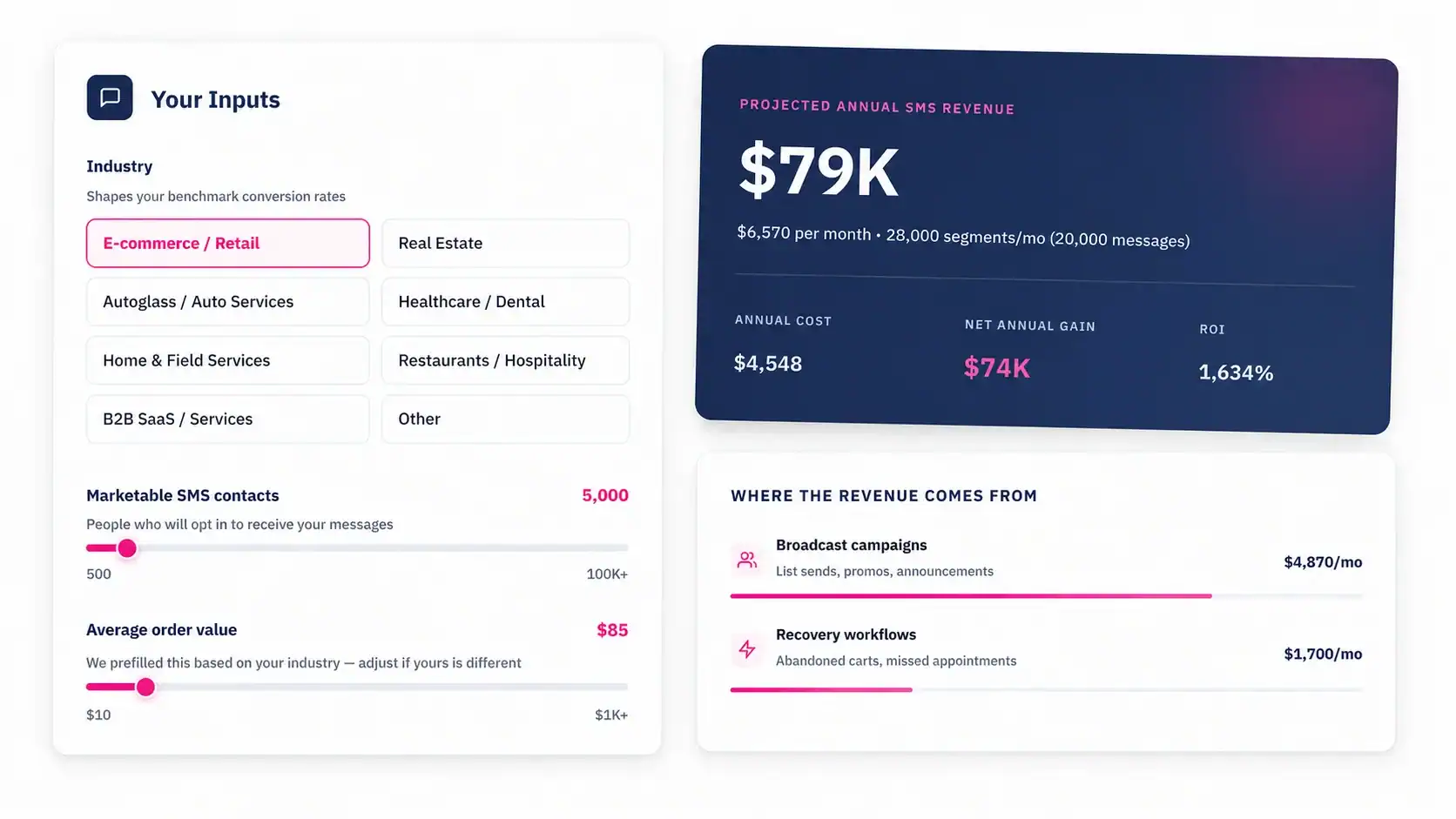
Talk to an Expert