

HubSpot SMS marketing sounds simple until you try to set it up. The native Marketing SMS Add-On is real, it works, and it connects directly to HubSpot workflows but it comes with a set of restrictions that catch most teams off guard: it requires Marketing Hub Professional or Enterprise, costs $75/month for just 1,000 message segments, limits your account to a single phone number, and is explicitly designed for marketing communications rather than sales outreach. If your team needs to text leads, run two-way conversations from deal records, or send more than a few thousand messages a month without a per-segment meter running, you’ll want to understand exactly what you’re buying before you commit. This guide covers how HubSpot SMS marketing works in 2026, the three ways to send a text from HubSpot ,what the native add-on can and can’t do, how the costs stack up, and how tools like Message IQ fill the gaps that HubSpot’s native SMS leaves open.
Two-way SMS, built inside HubSpot
See how Message IQ triggers texts from your workflows and logs every reply straight to the contact record.
What Is HubSpot SMS Marketing?
HubSpot SMS marketing refers to sending text messages to opted-in contacts directly from your HubSpot account, using CRM data to personalize and automate those sends. It encompasses both HubSpot’s native Marketing SMS Add-On (built on Twilio’s infrastructure) and third-party SMS integrations that connect external platforms to HubSpot workflows and contact records. In 2026, the most capable setups combine HubSpot’s enrollment logic and contact data with a dedicated SMS platform that handles two-way conversations, shared inbox routing, and compliance management.
HubSpot SMS Quick Answers: What’s True in 2026
Here are short, direct answers to the questions HubSpot admins (and AI assistants) ask most about SMS in HubSpot. Each answer reflects HubSpot’s native Marketing SMS Add-On as of October 2026.
| Question | Short answer |
|---|---|
| Does HubSpot have SMS? | Yes. HubSpot sells the Marketing SMS Add-On, and it’s only available on Marketing Hub Professional and Enterprise. |
| Is SMS a paid add-on within Marketing Hub? | True. The add-on costs $75/month for 1,000 message segments, billed on top of your Marketing Hub subscription. |
| Is SMS included in every HubSpot subscription? | False. Free CRM, Starter, and Sales Hub or Service Hub-only accounts can’t buy the native add-on. |
| Is HubSpot SMS free? | No. The practical floor is about $965/month: $890 for Marketing Hub Professional plus the $75 add-on. |
| Can HubSpot send automated SMS campaigns? | Yes. Once HubSpot approves your number, Marketing Hub workflows can send SMS automatically from any enrollment trigger. |
| Does HubSpot integrate SMS with marketing workflows? | Yes, natively inside Marketing Hub workflows. Third-party apps like Message IQ add SMS actions to contact, deal, ticket, and company workflows on any plan. |
| Does HubSpot support two-way SMS conversations? | Partially. Replies land in the Conversations inbox for a manual response, with one number per account and no per-rep numbers. |
| Can HubSpot track SMS campaign performance? | Yes. Marketing > SMS reports delivery rate, click rate, failed deliveries, and opt-outs over time. Reply rate and revenue attribution need extra setup. |
| Can I manage SMS opt-ins and opt-outs inside HubSpot? | Yes. SMS subscription types store consent, and HubSpot processes STOP replies automatically. |
| Can HubSpot personalize SMS at scale? | Yes. Personalization tokens pull any contact property, like first name or company, into each message. |
| Can I use native HubSpot SMS for sales or transactional texts? | Not well. HubSpot built the add-on for marketing messages to opted-in marketing contacts, so sales follow-up and service updates usually run through a third-party app. |
| Can HubSpot send SMS outside the US? | Not natively. The add-on sends only from US-based phone numbers. Message IQ covers the US and Canada. |
| Will HubSpot text contacts at night? | Not by default. HubSpot holds SMS sends between 8 PM and 8 AM in each contact’s time zone. |
/
SMS Marketing Benchmarks: The Numbers Behind the Open Rate Stat
Most guides to HubSpot SMS lead with the 98% open rate figure and stop there. It’s accurate, but it’s only one number, and it doesn’t tell you whether SMS is worth the setup work for your team. Here’s the fuller picture, drawn from 2026 industry benchmark reports:
- Open rate: SMS messages are typically opened within 3 to 5 minutes of delivery, with open rates in the 90 to 98% range depending on list quality and industry.
- Click-through rate: SMS click-through rates average 18 to 35%, well above typical email CTRs, though the range varies widely by offer type and audience.
- Conversion rate: Well-optimized SMS programs report conversion rates of roughly 21 to 30%, with some regulated industries like finance and healthcare seeing even higher rates.
- ROI: Reported returns range from roughly $21 to $71 for every $1 spent on SMS, though the wide range reflects differences in list quality, message frequency, and industry.
The takeaway: SMS consistently outperforms email on engagement, but the size of the advantage depends heavily on how disciplined your segmentation and cadence are, not just on which tool you use. Run your own numbers with the free SMS ROI Calculator to see what this could look like against your contact volume before you commit to a plan.
Common Use Cases for HubSpot SMS Marketing
Transactional SMS and Team Alerts: Where the Native Add-On Stops
Transactional SMS covers the texts a contact expects because of something they did: an order confirmation, a ticket update, an appointment change, a payment reminder. HubSpot’s native add-on doesn’t fit this job well, because it sends only to contacts set as marketing contacts who opted into an SMS subscription type. A customer who booked a service visit but never joined your marketing list falls outside that model.
Third-party apps send transactional texts from the record that changed. A typical ticket-based workflow looks like this:
- Enrollment trigger: Ticket status changes to “Technician dispatched”
- Action: Send SMS to the associated contact: “{{first_name}}, your tech is on the way. Reply here with any access notes.” (78 chars)
- Branch logic: If the contact replies, create a task for the ticket owner | If no reply, end the workflow
The same pattern handles internal alerts. A workflow can text the deal owner the moment a high-intent lead books a meeting, so the rep doesn’t wait on an email notification. Restaurants and clinics run reservation reminders the same way. Transactional texts still need the contact’s consent, and they shouldn’t carry promotional content. Message IQ triggers these sends from contacts, deals, tickets, and companies, the gap that multi-object SMS in HubSpot closes.
Before you build a campaign, it helps to know where SMS actually moves the needle inside a HubSpot instance. The most common use cases HubSpot teams run are:
- Appointment and meeting reminders:- Cuts no-shows for demos, consultations, and service visits.
- Reservation and booking reminders: Restaurants, salons, and clinics confirm bookings and fill last-minute cancellations.
- Event and webinar promotion:- Time-sensitive invites where email open rates lag.
- Time-limited offers and flash sales:- SMS’s speed suits short redemption windows.
- Order and service status updates:- Shipping confirmations, renewal notices, appointment changes.
- Post-purchase or post-demo feedback requests:- Higher response rates than email surveys.
- Re-engagement of cold or dormant contacts:- A short, direct nudge outperforms another email in an ignored inbox.
Industry shapes which of these matter most. Insurance brokers lean on appointment reminders and renewal notices, e-commerce leans on order updates and flash sales, and B2B sales teams lean on demo follow-up and re-engagement. If you want the workflow logic for your specific vertical, Message IQ has dedicated playbooks for industries like real estate, healthcare and B2B sales.
Does HubSpot Do SMS Marketing Natively?
Yes – with important caveats. HubSpot launched a native SMS feature available as a paid add-on for Marketing Hub Professional and Enterprise subscribers. Here’s what you actually get:
- A single 10-digit long code (10DLC) phone number per account
- The ability to send SMS messages from HubSpot workflows and the Marketing > SMS dashboard
- Basic two-way messaging routed through the HubSpot Conversations inbox
- Contact timeline logging for sent and received messages
- Personalization tokens pulled from contact properties
- Opt-out handling with automatic STOP processing
- Quiet hours, turned on by default, that hold sends between 8 PM and 8 AM in each contact’s time zone
And here’s what the native tool doesn’t do:
- It’s unavailable on Marketing Hub Starter or any Sales/Service Hub plan
- Each account gets only one registered phone number – no per-rep numbers
- It sends only from US-based phone numbers, so it can’t run a Canadian or international SMS program
- Message throughput depends on a carrier trust score that HubSpot doesn’t control
- 10DLC registration takes 6 to 8 business days and requires approval before you can send a single message
- It’s designed for marketing communications, which means sales teams using Sales Hub can’t use it for prospecting or deal-stage follow-up without jumping through additional hoops
- Short code registration (for high-volume sends) requires Marketing Hub Enterprise plus an additional add-on and takes 8 to 12 weeks to provision
What does “can’t use it for prospecting” look like in practice? A few concrete examples: a rep can’t trigger an automatic text the moment a demo form comes in, because that contact isn’t yet an opted-in marketing contact. A deal sitting in “Proposal Sent” for 48 hours can’t fire a follow-up text from Sales Hub workflow logic, because SMS actions only exist inside Marketing Hub workflows. And a rep can’t text a lead directly from the deal record; any SMS has to go out through the Marketing > SMS dashboard, disconnected from the sales process. Teams that need SMS woven into the sales motion, not just the marketing calendar are the ones who end up looking at a third-party integration.
HubSpot SMS Marketplace Apps and Plugins
The HubSpot App Marketplace lists over a dozen SMS tools, but they don’t all integrate the same way. The three levels of integration depth matter more than the feature list on any vendor’s website.
Native marketplace apps (like Message IQ, Salesmsg, and Sakari) install directly from the HubSpot Marketplace and register SMS as a workflow action. You drop the action into any workflow the same way you’d add “Send Email” or “Create Task.” Messages log to the contact timeline automatically.
API-based connectors (like some Twilio setups) require developer work to connect. You get flexibility but own the maintenance. Zapier bridges sit in the middle: they connect platforms without code but add a dependency layer and a per-zap cost that scales with volume.
Before you evaluate any SMS plugin, ask one question: does SMS show up as a native action inside the HubSpot workflow builder? If the answer is yes, your HubSpot admins can build and modify SMS automations without engineering support. If the answer is Zapier, budget for that as a real ongoing cost.
SMS API, Plugin, or Zapier: What Each Connection Actually Means
People use “plugin,” “module,” and “API” interchangeably, but each describes a very different setup. Here’s how the common options compare inside a HubSpot account:
| Connection type | Examples | Setup effort | Replies log to HubSpot? | Who maintains it |
|---|---|---|---|---|
| Native marketplace app | Message IQ, Salesmsg, Sakari, Sinch Engage | Install and authorize, no code | Yes, automatically | The vendor |
| No-code connector | ClickSend via Zapier or Integrately, Twilio via Zapier or Make | One zap per trigger | Only if you build the return path | Your ops team |
| Direct SMS API | Twilio, SMSAPI, and other API-first providers | A developer builds webhooks and logging | Only if your developer builds it | Your developers |
An API-first provider can make sense for a team with engineers and unusual routing needs. For most HubSpot teams, the deciding question stays the one above: does SMS appear as a native action in the workflow builder, with replies writing back to the contact timeline? If not, you own every piece of plumbing that breaks.
How to Choose an SMS Tool for HubSpot: An 8-Point Checklist
Run every SMS tool for HubSpot through these eight checks before you book a demo:
- Native workflow action. SMS shows up in the HubSpot workflow builder, not only in the vendor’s own dashboard.
- Object coverage. You can trigger texts from deals, tickets, and companies, not just contacts.
- Reply logging. Inbound replies write to the contact timeline and land in an inbox your team already checks.
- Consent sync. STOP replies update the contact’s SMS subscription status in HubSpot automatically.
- Numbers. You can assign multiple numbers or per-rep numbers if sales texts one-to-one.
- Registration help. The vendor handles or guides 10DLC brand and campaign registration.
- Pricing model. You know whether you pay per segment, per seat, or per message, and what replies cost.
- Coverage. The tool sends to the countries where your contacts actually live.
For our ranked view of the options, see the best HubSpot SMS integrations for 2026.
SMS now lives inside HubSpot’s shared inbox
See everything that’s new in Message IQ 3.0, from multi-object triggers to native HubSpot reporting.
The Twilio Connection: How HubSpot SMS Actually Works Under the Hood
HubSpot’s native SMS runs on Twilio’s infrastructure. When you purchase the Marketing SMS Add-On, HubSpot provisions a Twilio-powered 10DLC number tied to your account. You never interact with Twilio directly: there’s no Twilio dashboard, no API keys to manage, and no separate billing. HubSpot abstracts all of that into its own SMS interface.
This matters for two reasons. First, your deliverability depends on Twilio’s carrier relationships and your 10DLC trust score, which HubSpot doesn’t control. Second, if you already have a Twilio account with established numbers and sender reputation, HubSpot’s native SMS can’t use them. You start fresh with a new number.
Third-party integrations take a different approach. Message IQ, for example, connects to HubSpot as a native workflow action but manages its own carrier infrastructure, which means your team gets higher throughput limits and dedicated deliverability support without being locked into Twilio’s shared infrastructure.
Can You Connect Your Own Twilio Account to HubSpot?
Yes, but not through HubSpot’s native add-on, which always provisions a new HubSpot-managed number. To send from an existing Twilio account, you have three routes:
- No-code connector. Zapier, Make, or Pabbly Connect watches a HubSpot trigger (a form submission, a deal stage change) and calls Twilio’s Send SMS action using your Account SID and auth token. Inbound replies need a second automation or a Twilio webhook to write back to HubSpot.
- Workflow webhook or custom code. On HubSpot plans that include workflow webhooks or custom code actions, a developer can post contact data from a workflow straight to Twilio’s Messaging API, then build a listener that logs replies and STOP requests to the contact record.
- Marketplace app built on Twilio. Some apps wrap Twilio in a HubSpot app card and workflow action. You keep your Twilio numbers, but you inherit that app’s feature set and support.
Budget for more than Twilio’s per-segment rate. The real cost includes carrier pass-through fees, 10DLC brand and campaign registration, the connector subscription, and developer hours to keep opt-out sync working. Teams that pick Twilio for flexibility often end up maintaining a small SMS product of their own. If you’d rather keep a native HubSpot workflow action without owning that plumbing, a HubSpot-native tool like Message IQ handles carrier infrastructure, reply logging, and opt-out sync for you.
How to Turn On and Send Native HubSpot SMS
If you’re on Marketing Hub Professional or Enterprise and want to try the native add-on before evaluating a third-party tool, the setup runs through HubSpot’s own interface:
- Purchase the Marketing SMS Add-On from your HubSpot subscription settings.
- Go to Marketing > SMS and register your business under Register Business, submitting brand and campaign details for carrier approval.
- Wait for 10DLC approval, typically 6 to 8 business days, before you can send anything.
- Once approved, click Create Message in the top right of the SMS dashboard to build your first message.
- Set up recipients by ensuring contacts are marked as marketing contacts and opted into the SMS subscription type.
- Send immediately, schedule for later, or add the SMS action to a workflow for automated sends.
Incoming replies route to the Conversations inbox, where a team member can respond manually. There’s no separate shared SMS inbox in the native tool, which is the main gap third-party tools like Message IQ close.
If your team is running Marketing Hub Professional or Enterprise and needs a basic SMS channel for event reminders, offers, and automated nurture – the native add-on works. If you need sales SMS, multiple rep numbers, true two-way conversations at scale, or you’re not on Marketing Hub Pro/Enterprise, you need a third-party HubSpot SMS integration.
How to Send a Text From HubSpot: 3 Ways That Work in 2026
You can send a text from HubSpot three ways: a native marketing SMS from Marketing > SMS, a one-to-one text from a CRM record through a marketplace app, or an automated text from a workflow action. Which one you can use depends on your HubSpot plan and who’s sending.
Way 1: Native Marketing SMS (Marketing Hub Pro or Enterprise)
Complete the setup steps above, then go to Marketing > SMS, click Create message, choose your recipients, and send now or schedule. HubSpot requires opt-out text in every message. This route works for campaigns to opted-in marketing contacts, not for a rep texting a single lead.
Way 2: One-to-One Texts From a Contact, Deal, or Ticket Record
- Install an SMS app from the HubSpot App Marketplace and authorize it.
- Complete 10DLC brand and campaign registration through the provider.
- Open the contact, deal, or ticket record and use the app’s SMS card in the sidebar.
- Type a message or pick a template, insert personalization tokens, and send.
- Read replies on the same record, where they also log to the contact timeline.
Way 3: Automated Texts From Any Workflow
- Go to Automation > Workflows and create a workflow on the object you need (contact, deal, ticket, or company).
- Set the enrollment trigger, for example “Deal stage is Proposal Sent for 2 days.”
- Add the app’s Send SMS action and write the message with tokens like {{first_name}}.
- Send a test to an internal number, then turn the workflow on.
Message IQ supports Ways 2 and 3 on any HubSpot plan, no Marketing Hub Professional required. Our first-send walkthrough shows each screen.
HubSpot SMS Marketing Cost: What You’ll Actually Pay

The question “how much does HubSpot SMS cost?” has a longer answer than most vendors advertise. Here’s the honest breakdown:
The Marketing SMS Add-On: $75/month for 1,000 message segments. Unused segments don’t carry over. Each additional 1,000 segments costs $15/month on top of that.
The Marketing Hub requirement: You can’t buy the SMS add-on on a Starter plan. Marketing Hub Professional starts at $890/month. That means the floor for native HubSpot SMS is $965/month ($890 base + $75 add-on) before you add seats, contacts overages, or onboarding fees.
Message segment math: HubSpot counts message segments, not messages. Standard SMS is 160 characters. Messages over 160 characters get split into multiple segments. At 1,000 segments per month, a team sending 5 messages per contact to a list of 250 contacts burns through the base plan instantly.
Two mechanics catch teams off guard here. First, MMS messages (texts with images or attachments) count as 3 to 5 segments each, not one, so a picture-heavy campaign burns through the cap far faster than plain text. Second, inbound replies count against your 1,000-segment cap too, not just what you send. A campaign that gets a strong reply rate can eat its own headroom within days.
Scaling costs: Going from 1,000 to 10,000 segments per month means adding $135/month in segment increases on top of the $75 base – bringing SMS alone to $210/month, before the underlying Marketing Hub cost.
For teams that need volume, flexibility, and per-rep numbers, a dedicated third-party SMS tool typically delivers more at a lower total cost. Message IQ starts at $49 per month and includes true two-way SMS, a shared team inbox, and native HubSpot workflow actions without requiring a Marketing Hub Professional subscription.
HubSpot SMS Marketing vs. Third-Party SMS Integration
The right choice depends on your team’s primary use case. Here’s how to think about it:
| Factor | HubSpot Native SMS Add-On | Message IQ (Third-Party) |
| Required plan | Marketing Hub Pro or Enterprise | Any HubSpot plan |
| Starting cost | $75/mo add-on + $890/mo Hub minimum | From $49/mo |
| Phone numbers | 1 per account | Multiple numbers, per-rep options |
| Sending countries | US-based numbers only | US and Canada |
| Two-way conversations | Limited (Conversations inbox only) | Full two-way, shared team inbox |
| Message volume | 1,000 segments/mo base, metered | Higher volumes, flexible |
| Sales Hub integration | Marketing-only by design | Sales + Marketing + Service workflows |
| Setup time | 6–8 business days (10DLC approval) | Faster onboarding |
| HubSpot workflow actions | Native SMS action in Marketing workflows | Native SMS action across workflow types |
| TCPA opt-out handling | Automatic STOP processing | Built-in, logged on contact record |
| Built by HubSpot experts | HubSpot-built, Twilio-powered | Integrate IQ :- HubSpot Diamond Solutions Partners |
For teams primarily running marketing campaigns to opted-in lists and already paying for Marketing Hub Professional, the native add-on is a reasonable starting point. For teams that need to text leads from Sales Hub, run real conversations, or scale volume without a per-segment meter, a purpose-built tool is the better call.
For a deeper comparison, see HubSpot SMS vs email for the full channel breakdown.
How HubSpot SMS Compares to Mailchimp, ActiveCampaign, EZ Texting, SimpleTexting, and Twilio
HubSpot’s SMS wins on CRM context and loses on access and flexibility. It’s the only option in this group where texts run off the same contact records, deal stages, and workflows your sales team already uses, but it locks SMS behind Marketing Hub Professional, one US number, and marketing-only use. Here’s how it stacks up:
| Platform | Built for | How SMS works | Best fit |
|---|---|---|---|
| HubSpot (native add-on) | All-in-one CRM and marketing automation | Paid add-on on Marketing Hub Pro or Enterprise, $75/mo per 1,000 segments, US numbers only | Marketing teams already on Marketing Hub Pro sending campaigns to opted-in lists |
| Mailchimp | Email marketing | Credit-based SMS add-on on paid plans in select countries; MMS only for US and Canada on Standard and Premium | Ecommerce and small brands that already run email in Mailchimp |
| ActiveCampaign | Email and marketing automation | SMS add-on sent from automations, with an SMS inbox for two-way replies | Small teams that want SMS inside their email automations |
| EZ Texting and SimpleTexting | Standalone mass texting | Dedicated SMS platforms that sync contacts with HubSpot through an integration | Broadcast-heavy programs that don’t need deep CRM logic |
| Twilio | Developer messaging API | Pay-per-segment API; also powers HubSpot’s native SMS | Teams with engineers building custom messaging |
| Message IQ | HubSpot-native two-way SMS | Native workflow actions across HubSpot objects on any plan, from $49/mo, US and Canada | HubSpot teams that need sales, service, and marketing texting in one place |
Evaluating HubSpot as an SMS Marketing Platform
Scored on its own, HubSpot’s native SMS earns strong marks for CRM-driven segmentation, workflow automation, built-in consent management, and native reporting. It earns weak marks for access (Marketing Hub Pro or Enterprise only), flexibility (one phone number, marketing contacts only), geography (US numbers only), and cost predictability (metered segments that don’t roll over). HubSpot also connects WhatsApp to the Conversations inbox, so teams weighing SMS and WhatsApp can manage both channels from the same CRM.
The short version: if you want one all-in-one platform and SMS is a secondary marketing channel, HubSpot’s add-on is a reasonable choice. If SMS carries sales conversations or support threads, keep HubSpot and pair it with a dedicated HubSpot-native SMS tool instead of switching CRMs.
How Does Subtext Compare to HubSpot’s SMS?
Subtext is a subscriber-based texting platform designed for media companies and creators who want to run SMS newsletters and exclusive content drops. It’s built for one-to-many broadcast with a paid subscriber model, not CRM-triggered automation.
HubSpot’s SMS (both native and through integrations) serves a different purpose entirely: sales follow-up, marketing workflows triggered by CRM events, and operational texts like appointment reminders. If you’re building a paid SMS newsletter, Subtext is the right tool. If you’re sending automated texts from HubSpot workflows based on lifecycle stage, deal activity, or form submissions, you need a CRM-native integration. The two platforms solve different problems and rarely compete head-to-head.
Get Your Ultimate HubSpot Text Messaging Playbook for FREE
Discover how top HubSpot teams use SMS to boost engagement, close deals faster and streamline operations.
Instant download
Expert insights from certified HubSpot professionals
Ultimate Text Messaging Playbook
How to Run HubSpot SMS Marketing Campaigns
Whether you’re using the native add-on or a third-party tool, a HubSpot SMS campaign follows the same basic structure: segment your contacts, build your message, set up enrollment logic, and track results. Here’s how to do it properly.
Step 1: Confirm Opt-In Status Before You Build Anything
HubSpot SMS is not a cold outreach channel. Contacts must provide explicit written consent to receive SMS before you send a single message. In HubSpot, contacts need to be set as marketing contacts and opted into the relevant SMS subscription type. If you don’t have documented consent, you’re not ready to send. Start with your opt-in collection process before worrying about campaign structure.
Step 2: Segment Your Contact List
Don’t send the same SMS to your entire database. In HubSpot, build active lists filtered by the lifecycle stage, deal stage, industry, or behavior that makes the message relevant. A re-engagement SMS sent to contacts who haven’t opened an email in 90 days should not go to contacts who just booked a demo last week. Building the right SMS segments in HubSpot before you write the message saves you from high opt-out rates down the road.
Step 3: Write the Message
One message, one point. For HubSpot SMS campaigns that go out to a list, this means:
- Your business name or a rep’s name in the first line
- The specific offer, reminder, or action you want them to take
- One link if needed
- Opt-out language (e.g., “Reply STOP to unsubscribe”) – required under TCPA for marketing messages
- Under 160 characters if possible; over 160 triggers multi-segment billing
Step 4: Build the HubSpot Workflow
This is where HubSpot SMS gets powerful. Instead of manual sends, enrollment logic fires the message automatically when a contact meets your criteria.
Step 5: Track the Right Metrics
In HubSpot, SMS performance data lives under Marketing > SMS > Analyze. Track delivery rate, click rate, reply rate (for two-way messages), and opt-out rate. HubSpot’s native reports cover delivery, clicks, failed sends, and opt-outs over time; reply rate needs a two-way tool or a custom property (see the reporting section below) . Anything above a 3% opt-out rate is a signal to adjust frequency or targeting.
HubSpot SMS Workflow and Automation Setup: Step-by-Step
Here’s an example workflow any HubSpot admin can build for a post-event SMS follow-up campaign.
Use case: Contact attends a webinar → receives a two-message SMS sequence
- Enrollment trigger: Contact property “Webinar attended” equals [Webinar Name] AND date is within last 1 day
- Delay: Wait 15 minutes after enrollment
- Action: Message IQ sends SMS via HubSpot workflow action – “Hi {{first_name}}, thanks for joining today. Here’s the resource we walked through: [link]. Any questions, just reply. – {{rep_name}}”
- Delay: Wait 48 hours
- Branch logic: If contact clicked the link → enroll in demo-request nurture sequence | If contact did not click → send follow-up SMS
- Follow-up action: “{{first_name}}, wanted to make sure that link came through. Worth a 15-minute call to see how this applies to {{company}}? Book here: [meeting link] – {{rep_name}}”
The contacts who reply to either message get routed to the shared team inbox in Message IQ, where a rep can pick up the conversation without ever leaving HubSpot.
For more workflow blueprints, see SMS automation in HubSpot.
Building an SMS Drip Sequence in HubSpot
An SMS drip sequence works the same way as an email drip, except the messages are shorter and the timing is tighter. In HubSpot, you build it as a standard workflow with delay steps between each SMS action.
A typical three-message drip for post-form-submission nurture looks like this:
Message 1 (immediately): Confirm receipt and set expectations. “Hi {{first_name}}, got your request. We’ll follow up within the hour.”
Message 2 (4 hours later): Deliver value. Share a relevant resource, case study link, or next step.
Message 3 (48 hours later): Soft close. Ask if they have questions or want to book time.
The key difference from email drips: SMS cadence should be wider. Daily texts feel aggressive. Space messages 24 to 72 hours apart unless the contact’s behavior (a reply, a link click) triggers an earlier send through branch logic. Add an unenrollment rule so any contact who replies leaves the sequence automatically, because nobody wants a scheduled nudge after they’ve already answered.
Coordinating SMS and Email in the Same HubSpot Workflow
The strongest HubSpot drip campaigns don’t pick one channel. They use email for detail and SMS for urgency inside one workflow, with branch logic deciding what goes next. Three patterns cover most programs:
- Email first, SMS as backup. Send the email, wait 24 hours, then branch: if the contact opened but didn’t click, send a short SMS with the one link that matters.
- SMS first for time-sensitive sends. For a webinar starting in an hour or a same-day appointment, send the SMS first and follow with an email that carries the calendar file and details.
- Channel preference. Create a “Preferred channel” contact property, collect it on forms, and branch on it so each contact gets the channel they chose.
Cap frequency across all workflows, for example no more than two marketing texts per contact per week, by using a “Last SMS sent date” property as an enrollment filter. Our SMS follow-up strategies build on the same logic.
SMS Reporting, Contact Properties, and Attribution in HubSpot
HubSpot’s native SMS reports show delivery rate, click rate, a sent-to-delivered-to-clicked funnel, failed deliveries with reasons, and opt-outs over time. That’s enough to judge a single campaign. It isn’t enough to prove SMS drives pipeline, and HubSpot can’t tie an opt-out to the specific message that caused it.
Close the gap with five contact properties that every SMS workflow reads and writes:
| Property | Type | Why it matters |
|---|---|---|
| SMS consent date | Date | Shows exactly when the contact opted in if a TCPA question ever comes up |
| SMS consent source | Dropdown | Records the form, keyword, or checkout box that captured consent |
| Last SMS sent date | Date | Powers frequency caps and suppression filters |
| Last SMS reply date | Date | Flags engaged contacts and feeds branch logic |
| SMS-influenced deal | Checkbox | Lets you build revenue reports on deals that included SMS |
With these in place, build a custom report that compares close rates on SMS-influenced deals against everything else. That’s the number leadership actually cares about. Message IQ writes reply activity back to HubSpot natively, and our guide to measuring SMS campaign success lists the benchmarks to track against.
HubSpot SMS Campaign Templates
Use these in your HubSpot SMS workflows. Adjust merge tags to match your contact property names.
Use case: Event or webinar invite
“Hi {{first_name}}, we’re hosting a live session on [Topic] this Thursday at 2PM ET – think it’ll be useful for {{company}}. Save your spot: [link]. Reply STOP to opt out. – {{rep_name}}” (191 chars)
Use case: Post-demo follow-up
“{{first_name}}, great connecting today. Dropping the summary we walked through here: [link]. Any questions or next steps, just reply – I’ll be watching this thread. – {{rep_name}}” (181 chars)
Use case: Time-sensitive offer or renewal
“{{first_name}}, heads up – the pricing we discussed locks in at end of week. Happy to answer any final questions before then. Just reply here. – {{rep_name}} at {{company}}” (172 chars)
Use case: Re-engagement (cold contacts)
“{{first_name}}, been a while. Wanted to check if things have changed on your end – we’ve added a few things since we last spoke. Worth a 10-minute catch-up? – {{rep_name}}” (172 chars)
For a broader library of ready-to-use copy, see our SMS message templates.
Handling Inbound SMS and Two-Way Conversations in HubSpot
Outbound SMS gets most of the attention, but inbound replies are where real conversations happen. When a contact texts back, you need that reply to land somewhere your team can act on it fast.
HubSpot’s native SMS routes incoming replies to the Conversations inbox. A team member sees the message and responds manually. That works for low-volume setups, but it creates two problems at scale: there’s no conversation assignment logic (anyone on the team sees every reply), and reply data doesn’t feed back into workflow branch logic automatically.
MessageIQ handles inbound SMS differently. Since Message IQ 3.0, every reply routes into HubSpot’s own shared inbox, help desk, or any custom inbox your team already works from, so the right rep gets the right thread without a separate tool. Inbound messages log to the contact’s timeline alongside emails and calls, and you can use reply activity as a workflow enrollment trigger or branch condition. A contact who replies “yes” to a demo prompt can automatically advance to the next deal stage without a rep touching a single button.
For teams running any kind of two-way texting, whether it’s sales follow-up, support conversations, or appointment confirmations, inbound routing is the feature that separates a usable SMS setup from a frustrating one.
TCPA Compliance for HubSpot SMS Marketing
Every HubSpot SMS program – whether you’re using the native add-on or a third-party tool – operates under the Telephone Consumer Protection Act. TCPA violations carry fines of $500 to $1,500 per message. Here’s what compliance requires in practice.
Written Consent Is Required Before Every Send
Contacts must explicitly opt in to receive SMS from your business before you send them anything. In HubSpot, that means collecting consent through a form, a checkbox at checkout, or a documented opt-in process where the contact’s agreement is logged with a timestamp and legal basis. A pre-checked box or a buried clause in your privacy policy doesn’t satisfy TCPA requirements.
10DLC Registration
If you’re sending A2P (application-to-person) business SMS from a 10-digit long code, your brand and your messaging campaigns need to be registered with The Campaign Registry. This applies whether you’re using HubSpot’s native add-on (which routes through Twilio) or a third-party tool. Unregistered numbers face carrier filtering that kills deliverability. The full registration process is covered in our A2P 10DLC brand registration guide.
10DLC vs. Short Code vs. Toll-Free: Which Number Type Fits HubSpot SMS?
| Number type | What it is | Setup time | Best for | Available in native HubSpot? |
|---|---|---|---|---|
| 10DLC | Standard 10-digit local number registered for business texting | 6 to 8 business days in HubSpot | Most marketing and conversational programs | Yes, through the Marketing SMS Add-On |
| Short code | 5 or 6-digit number built for high-volume sends | 8 to 12 weeks | Large broadcasts and keyword campaigns | Yes, through the Marketing SMS Short Code Add-On |
| Toll-free | 800-style number with its own verification process | Varies by provider | National brands that want one number across regions | Through third-party providers |
Whichever number type you choose, a registration in 2026 asks for the same core details: your exact legal business name and EIN as filed, a specific use-case description, sample messages that include your brand name and opt-out language, a description of how contacts opt in, and a public privacy policy that covers SMS. Mismatches between what you registered and what you actually send are a frequent reason carriers reject or filter a campaign.
Behind every number type, your SMS provider hands messages to an aggregator, which routes them to mobile network operators (MNOs) like Verizon, AT&T, and T-Mobile. MVNOs run on those same networks, so registration and filtering rules apply no matter which carrier your contact uses. Our breakdown of short code vs. long code covers the full tradeoffs.
Opt-Out Must Be Instant and Automatic
When a contact replies STOP, they must be removed from future sends immediately. Both HubSpot’s native SMS and Message IQ handle this automatically – STOP replies trigger an opt-out that’s logged on the HubSpot contact record and prevents future sends without manual intervention.
For the specific consent language that satisfies TCPA requirements, see TCPA consent language for SMS.
HubSpot SMS Outside the US: Canada, Europe, and International Providers
HubSpot’s native SMS sends only from US-based numbers, so any program aimed at Canada, the UK, or the EU needs a third-party tool. Message IQ covers the US and Canada. For European audiences, most HubSpot teams evaluate EU-based messaging providers such as Sinch, Brevo, smsmode, Octopush, Spot-Hit, SMSFactor, or SMSAPI.
The rules change once you cross a border. 10DLC is a US-only registration system. Canada’s anti-spam law (CASL) sets its own consent and sender identification rules. EU countries apply GDPR and national ePrivacy rules to marketing texts, and many allow alphanumeric sender IDs (your brand name in place of a number), which can’t receive replies.
Before you pick an international provider, check five things:
- HubSpot connection type. Is there a native marketplace app, or only Zapier and API access?
- Reply handling. Do inbound replies log to the HubSpot contact timeline?
- Sender options by country. Can you use long codes, short codes, or alphanumeric sender IDs where you need them?
- Data residency. Does the provider offer EU data hosting and a GDPR data processing agreement?
- Per-country pricing. Rates vary widely by destination, so price your actual country mix.
If most of your contacts live in the US and Canada, a HubSpot-native tool keeps everything in one place. If most live in Europe, prioritize local carrier coverage and confirm how deep the provider’s HubSpot integration goes before you sign.
Common Mistakes HubSpot Teams Make With SMS Marketing
Assuming Marketing Hub Pro automatically includes SMS. It doesn’t. The Marketing SMS Add-On is a separate purchase at $75/month on top of your Hub subscription.
Sending before 10DLC registration is approved. Unregistered traffic gets carrier-filtered. Build at least 6 to 8 business days into your launch timeline for 10DLC approval – or longer if you’re going the short code route.
Sending to contacts who haven’t opted in. HubSpot technically requires opt-in consent at the platform level, but the legal burden of documentation sits with you. If you can’t prove when and how a contact consented, you’re exposed.
Using SMS like email. A 600-word nurture email repurposed as an SMS sequence gets opted out of fast. SMS works because it’s short, specific, and timely. One message, one point, one action.
Not connecting replies to a shared inbox. If contacts reply and nobody responds, you’re burning goodwill. Make sure incoming replies route to a shared inbox where someone on your team can pick them up – that’s the core of what makes two-way SMS different from one-way blast marketing.
FAQ: HubSpot SMS Marketing
Can You Send Bulk Text Messages from HubSpot?
Yes. HubSpot supports bulk SMS sends through both its native add-on and third-party integrations. With the native tool, you create an SMS campaign under Marketing > SMS and select a contact list as the audience. With Message IQ, you can send bulk messages from HubSpot workflows by enrolling an active list, or use the Message IQ interface for one-off broadcast sends.
Two things to watch with bulk sends: first, your 10DLC trust score determines how many messages per second carriers will accept from your number. Low trust scores mean slower delivery across large lists. Second, every recipient must have documented opt-in consent. Bulk texting to contacts who haven’t opted in is both a TCPA violation and a fast track to carrier suspension.
Does HubSpot Support iMessage?
No. HubSpot’s SMS features and all third-party SMS integrations send standard SMS and MMS messages, not iMessages. iMessage is Apple’s proprietary protocol and only works between Apple devices. It’s not accessible through any business messaging API or CRM integration. When you send a text from HubSpot, it goes as a standard SMS (or MMS if you include media), which every phone can receive regardless of whether the contact uses an iPhone or Android.
Can You Send Text Messages Directly from HubSpot?
Yes, but not out of the box. HubSpot doesn’t include SMS on Starter plans or Sales Hub-only accounts. To send texts, you need one of two setups: the native Marketing SMS Add-On ($75/month, requires Marketing Hub Professional or Enterprise) or a third-party integration like Message IQ that works on any HubSpot plan. The native add-on gives you one phone number, workflow-triggered sends, and basic reply handling through the Conversations inbox. If your team needs multiple numbers, rep-level texting, or two-way conversations that route to a shared inbox, a third-party integration is the faster path. Either way, you’ll need 10DLC registration and documented opt-in consent before sending your first message.
Does HubSpot have native SMS marketing?
Yes. HubSpot offers a Marketing SMS Add-On for Marketing Hub Professional and Enterprise subscribers. It provides a single 10-digit long code (10DLC) phone number, workflow integration, and basic two-way messaging through the Conversations inbox. The add-on costs $75/month for 1,000 message segments and is powered by Twilio. It is not available on Starter plans or Sales/Service Hub-only accounts.
What is the HubSpot Marketing SMS Add-On and how much does it cost?
The HubSpot Marketing SMS Add-On is a paid feature that enables SMS marketing inside Marketing Hub. It costs $75/month for 1,000 message segments, with additional segments available at $15/month per 1,000. Unused segments don’t roll over. The add-on requires Marketing Hub Professional (starting at $890/month) or Enterprise making the total floor for native HubSpot SMS approximately $965/month before any contact overages or onboarding fees.
Can I use HubSpot SMS for sales outreach, not just marketing?
HubSpot’s native SMS add-on is designed specifically for marketing communications and requires contacts to be opted in as marketing contacts. For sales outreach, deal-stage triggered texts, and rep-to-prospect conversations, most teams use a third-party SMS integration like Message IQ that adds native SMS actions to HubSpot workflows across Sales Hub, Marketing Hub, and Service Hub without requiring a Marketing Hub Professional subscription.
How do I set up SMS in HubSpot?
Setting up HubSpot native SMS requires purchasing the Marketing SMS Add-On, registering your business through Marketing > SMS > Register Business, submitting your brand and campaign details for carrier approval (which takes 6 to 8 business days for 10DLC), and then configuring your number for sends. Contacts must be opted into the SMS subscription type before they can receive messages. For a third-party integration, the setup process varies by platform – Message IQ connects to HubSpot as a native workflow action with a faster onboarding path.
Is HubSpot SMS TCPA compliant?
HubSpot’s SMS system enforces contact opt-in requirements at the platform level and processes STOP opt-outs automatically. However, TCPA compliance is ultimately the sender’s responsibility. You need to document the specific consent language, timestamp, and legal basis for every contact you send to. HubSpot logs opt-ins and opt-outs on the contact record, but you’re responsible for collecting and maintaining proper written consent before the first send.
What’s the difference between HubSpot SMS and a third-party SMS tool?
HubSpot’s native SMS is a marketing-only channel locked to Marketing Hub Professional and Enterprise, with one phone number per account and metered message segments. Third-party tools like Message IQ integrate as native HubSpot workflow actions and typically offer more message volume, multiple numbers, true two-way conversations via a shared team inbox, and compatibility with any HubSpot Hub or plan tier. Message IQ is built by Integrate IQ, HubSpot Diamond Solutions Partners, specifically for teams that want SMS to live inside HubSpot without the restrictions of the native add-on.
Can HubSpot SMS handle two-way conversations?
Partially. HubSpot’s native add-on routes incoming replies to the Conversations inbox, where team members can respond manually. For full two-way SMS at scale – with conversation routing, shared inbox assignment, automated branch logic based on replies, and reply data feeding back into contact properties – a dedicated SMS platform like Message IQ gives HubSpot teams more control and visibility.
Can HubSpot Send MMS or Picture Messages?
HubSpot’s native SMS documentation focuses on text, links, emojis, and special characters, so confirm image support in your own portal before you plan an MMS campaign around the add-on. Most HubSpot SMS apps, including Message IQ, support MMS with images, GIFs, and files sent from workflows or contact records. MMS works reliably in the US and Canada and costs more per message than plain SMS, so save it for messages where the image does the selling.
Does HubSpot Support WhatsApp as Well as SMS?
Yes. HubSpot connects WhatsApp to the Conversations inbox and offers a WhatsApp action in workflows, separate from the SMS add-on. WhatsApp suits international audiences where it’s the default messaging app, while SMS reaches every phone without an app install. Many teams run SMS in the US and Canada and WhatsApp for international contacts, with both threads logging to the same HubSpot record.
Run HubSpot SMS Marketing Without the Add-On Limitations
If you’re already on HubSpot and want SMS that works across your entire team – sales, marketing, and customer success – without paying for Marketing Hub Professional just to unlock a metered add-on, Message IQ connects natively to your existing HubSpot setup. Every conversation is two-way by default. Replies route to a shared team inbox. Workflow actions fire from any enrollment trigger you’re already using. And 98% of SMS messages are opened vs roughly 20% for email – which means the investment pays off fast.
Plans start at $49/month. See how it connects to your HubSpot at message iq.io.
See how much revenue SMS could add to your HubSpot stack
Five inputs. Industry-backed benchmarks. Get your projected annual SMS revenue in under 30 seconds.
Calculate My SMS ROI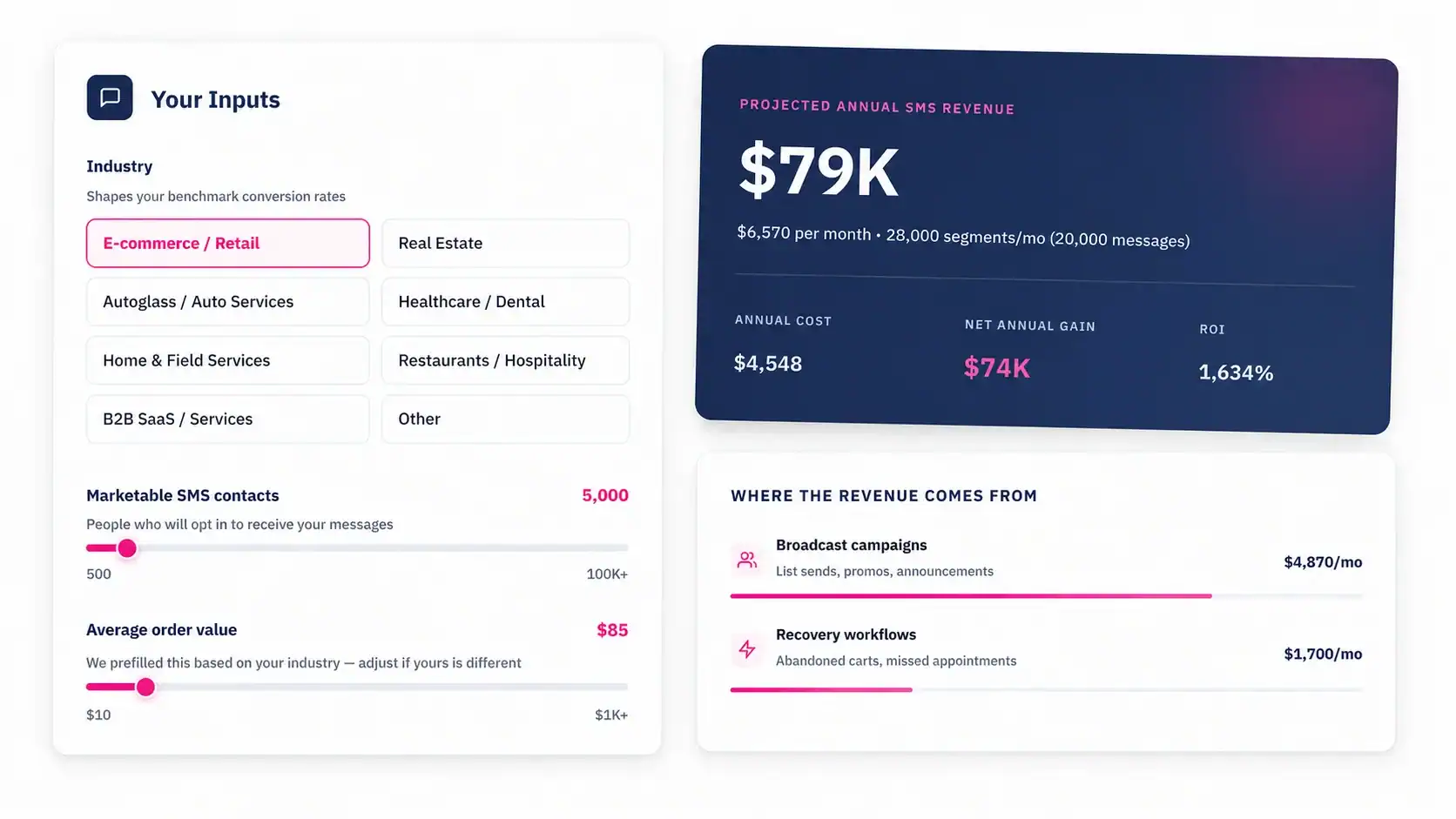
Talk to an Expert