Everyone quotes big SMS marketing ROI numbers, but few teams can show their own. The problem usually isn’t the channel. It’s that costs get undercounted and revenue never gets tied back to the text that drove it.
SMS marketing ROI is the return you earn from text messaging compared with what you spend on it. You calculate it as (revenue from SMS minus SMS costs) divided by SMS costs, shown as a percentage. A result of 300% means every $1 spent on texting brought back $3 more than it cost.
This guide gives you the formula, a worked example, the costs most teams forget, and how to track SMS revenue in HubSpot so the number holds up.
The SMS marketing ROI formula
Use this formula:
SMS ROI = (SMS revenue − SMS costs) ÷ SMS costs × 100
Two choices change the answer a lot, so decide them up front:
- Revenue or profit. Using revenue makes ROI look bigger. Using gross profit (revenue × your margin) gives a truer picture. Pick one and use it every month.
- Attribution window. Decide how long after a text a purchase still counts, such as 7 days after a click.
What counts as SMS cost
Most ROI numbers look great because they leave out costs. Count all of these:
- Platform fee: your monthly texting plan
- Carrier fees: per-message surcharges, if your plan doesn’t include them
- Registration: 10DLC campaign fees, usually a few dollars a month per campaign
- Overage: any messages over your plan
- Team time: hours spent writing, building workflows and answering replies
- Offers: the cost of any discount you give in the text
Our guide to SMS marketing pricing covers each cost in detail.
What counts as SMS revenue
Count revenue you can tie to a text within your attribution window:
- Direct purchases from tracked links in a text
- Booked appointments or meetings that turn into revenue
- Recovered revenue, such as abandoned carts or unpaid invoices paid after a reminder
- Saved revenue, such as fewer no-shows after reminder texts
Saved revenue is real, but estimate it carefully. Compare no-show rates for a few weeks before and after reminders start, instead of guessing.
A worked SMS ROI example
Here’s an example for an online store. The inputs are assumptions, so swap in your own numbers.
| Input | Value |
|---|---|
| Opted-in contacts | 3,000 |
| Texts per contact per month | 2 (6,000 texts) |
| Texts that lead to a purchase | 1.5% (90 orders) |
| Average order value | $80 |
| Gross margin | 40% |
Monthly costs:
| Cost | Amount |
|---|---|
| Texting plan (10,000 messages) | $399 |
| Carrier fees (6,000 × about $0.0045) | $27 |
| 10DLC campaign fee | $10 |
| Team time (4 hours × $40) | $160 |
| Total | $596 |
Results:
- Revenue: 90 orders × $80 = $7,200
- ROI on revenue: ($7,200 − $596) ÷ $596 = 1,108%
- Gross profit: $7,200 × 40% = $2,880
- ROI on profit: ($2,880 − $596) ÷ $596 = 383%
Both numbers are correct. The profit-based ROI is the one to show your finance team.
Get Your Ultimate HubSpot Text Messaging Playbook for FREE
Discover how top HubSpot teams use SMS to boost engagement, close deals faster and streamline operations.
Instant download
Expert insights from certified HubSpot professionals
Ultimate Text Messaging Playbook

Use the free SMS ROI calculator
Our SMS ROI calculator does this math for you. Enter your industry, number of contacts, average order value and texts per month, and it projects annual SMS revenue, cost and ROI in about 30 seconds. Use it to set a target, then measure real results against it.
How to track SMS ROI in HubSpot
ROI only holds up if every dollar ties back to a text. In HubSpot, set it up like this:
- Use tracked links. Add UTM parameters, or use a texting tool that tracks clicks and logs them to the contact. Message IQ’s link tracking shortens each URL and reports clicks on the contact record.
- Log every text and reply on the contact timeline, so you can see who received what before they bought.
- Create an “SMS influenced” property on deals or orders, set by a workflow when a contact clicked an SMS link within your attribution window.
- Build a report that sums revenue from deals where that property is true, by month.
- Track costs monthly in one place, including team time.
For campaign-level metrics like delivery, clicks and replies, see how to measure SMS marketing campaign success.
How to improve SMS marketing ROI
- Text the right segment. Smaller, well-targeted sends often beat big blasts. See how to build SMS segments in HubSpot.
- Automate high-value moments, like abandoned carts, quote follow-ups and appointment reminders.
- Keep texts to one segment to avoid paying double for long messages.
- Answer replies fast. Replies are often buying signals, so route them to the right person.
- Prune your list. Remove numbers that fail and contacts who never engage.
Frequently asked questions
How do you calculate SMS marketing ROI?
Subtract your total SMS costs from the revenue you can tie to texts, divide by the costs, and multiply by 100. Include platform fees, carrier fees, registration fees and team time in your costs.
What is a good ROI for SMS marketing?
It depends on your margin and what you sell, so compare against your own email and paid channels rather than a general benchmark. A profit-based ROI above 100% means the channel earns more than it costs.
Should I use revenue or profit for SMS ROI?
Use profit if you can. Revenue-based ROI looks larger but ignores the cost of the goods you sold. Whichever you choose, use it consistently so month-to-month numbers compare.
How do I track SMS revenue in HubSpot?
Use tracked links in every text, log texts and clicks to the contact record, and flag deals or orders that came after an SMS click. Then report on revenue from those deals each month.
Is there a free SMS ROI calculator?
Yes. The Message IQ SMS ROI calculator estimates annual SMS revenue, cost and ROI from five inputs, including industry, contacts and order value.
See how much revenue SMS could add to your HubSpot stack
Five inputs. Industry-backed benchmarks. Get your projected annual SMS revenue in under 30 seconds.
Calculate My SMS ROI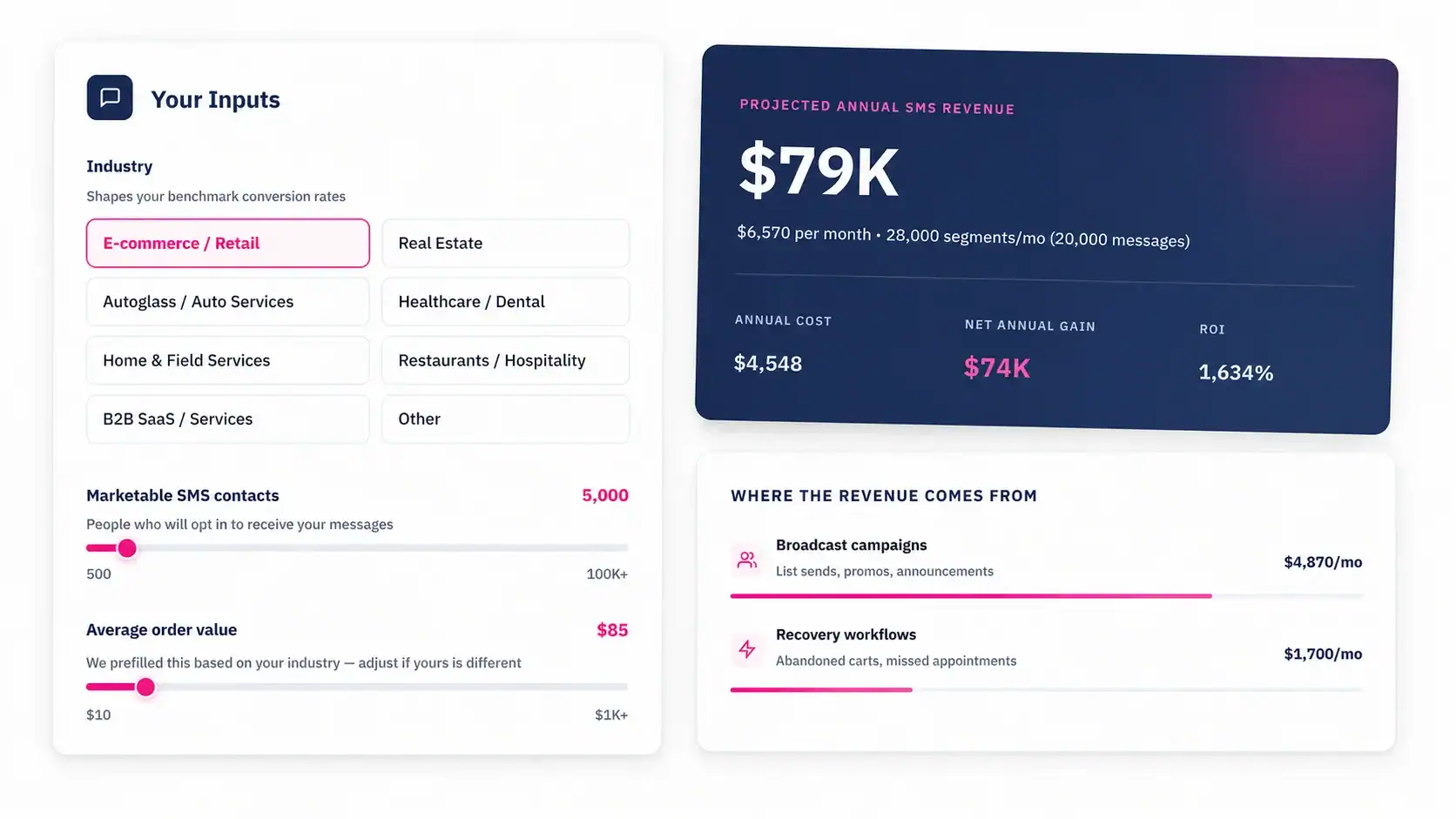
Turn the estimate into a real number
Start with the calculator, set a target, then track real revenue in HubSpot for 60 to 90 days.
Message IQ logs every text, reply and link click to HubSpot, from $49 a month with unlimited users. Try the SMS ROI calculator or see plans.