

Loan officers who respond to a new lead within five minutes are 21 times more likely to convert that contact than those who wait 30 minutes. The problem is that most mortgage teams are still relying on manual follow-up, which means they’re losing deals before a human even picks up the phone. A mortgage CRM with SMS solves this by turning your CRM data into automated, timely text messages that fire without anyone having to think about it. MessageIQ is built specifically for this kind of CRM-triggered SMS automation, running natively inside HubSpot so every message is tied to a real contact record.
This post breaks down exactly how mortgage CRM SMS automation works at a mechanical level: what triggers the messages, how the workflows are structured, what the texts should say, and where compliance fits in.
What Is Mortgage CRM with SMS Automation?
Mortgage CRM with SMS automation is the use of contact data and pipeline events inside a CRM to automatically send text messages to borrowers, leads, and referral partners at defined points in the loan process. Rather than a loan officer manually drafting and sending individual texts, the CRM triggers pre-built SMS workflows based on specific conditions: a form submission, a loan stage change, a document request, or a date-based event like a closing anniversary.
The result is consistent, personalized communication at scale, without adding workload.
Why Automated SMS Works Differently in Mortgage Than in Other Industries

Mortgage has a few properties that make SMS automation especially high-impact, and also especially unforgiving if it’s set up wrong.
The buying cycle is long. A borrower might take 60 to 90 days from first inquiry to close. Without an automated nurture sequence, most of those contacts go cold simply because no one followed up at the right moment. Automated SMS keeps loan officers top of mind throughout that window without burning manual time.
The lead window is short. Research from Insellerate found that 40% of mortgage leads are never contacted at all, and the average response time across the industry sits at six hours. Borrowers shopping rates fill out multiple forms in the same session. The broker who texts back in 90 seconds wins the conversation.
The stakes for non-compliance are high. The Telephone Consumer Protection Act (TCPA) sets fines between $500 and $1,500 per violation, per message. A single non-compliant SMS blast to a purchased list could expose a mortgage company to six-figure liability. Automated systems that don’t handle consent properly are a serious legal risk.
The mechanics of how the automation works directly affect all three of these dynamics.
The Five Trigger Types That Power Mortgage SMS Automation
Every automated SMS starts with a trigger. In a mortgage CRM, there are five categories of triggers that loan officers use consistently.
1. Lead Capture Triggers
When a borrower fills out a rate inquiry form, a pre-qualification request, or any lead capture form connected to the CRM, the contact record is created and the workflow fires immediately. This is the speed-to-lead use case. The first SMS should go out within 60 to 90 seconds of form submission.
This trigger is the highest-leverage automation in mortgage. No human follow-up process is fast enough to compete with an automated response at this stage.
2. Loan Stage Change Triggers
As a loan moves through the pipeline, the CRM contact or deal record updates. Each stage change can trigger a unique SMS:
- Application submitted
- Appraisal ordered
- Conditional approval received
- Clear to close issued
- Closing date confirmed
Borrowers want to know where their loan stands. A text at each milestone answers that question before they have to call and ask.
3. Document Request Triggers
When a processor flags a missing document, a CRM field updates. That update triggers an SMS to the borrower reminding them of the outstanding requirement and often linking directly to an upload portal. Response rates on document request texts are significantly higher than on emails because the message arrives in the same inbox borrowers use to communicate with friends and family.
4. Date-Based and Time-Delay Triggers
These fire based on calendar logic rather than a contact action. Common examples include:
- Sending a rate check text 12 months after a loan closes
- A closing anniversary message with a referral request
- A pre-approval expiration reminder 60 days before the pre-approval expires
- A birthday or holiday message to stay top of mind with past clients
Date-based triggers handle the long-tail relationship work that loan officers know they should be doing but never actually get to manually.
5. Behavioral and Re-Engagement Triggers
If a contact opens a rate comparison email but doesn’t respond, or visits the rate calculator page more than twice, that behavioral signal can trigger an SMS follow-up. This is more advanced and typically requires marketing automation capabilities inside HubSpot, but it’s one of the highest-converting trigger types because the message catches borrowers at a moment of active intent.
How Mortgage CRM SMS Workflows Are Structured in HubSpot
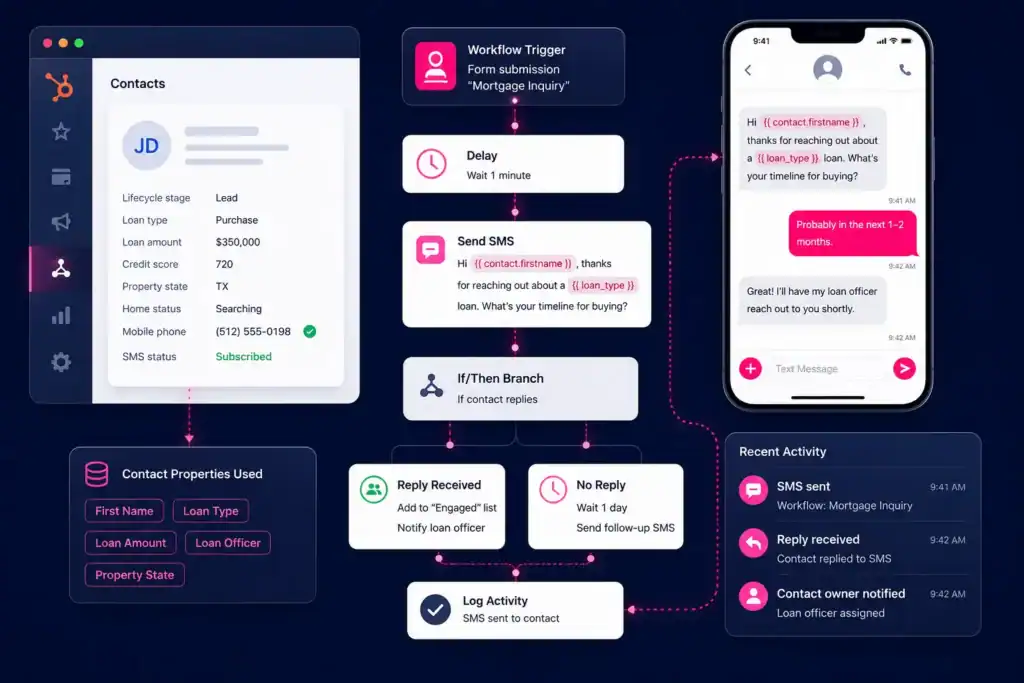
Understanding the trigger types is step one. The actual mechanics of how those triggers become text messages inside HubSpot are what most guides skip over.
MessageIQ connects to HubSpot’s native workflow engine directly, so every step below maps to real HubSpot workflow actions. There’s no third-party middleware or Zapier dependency to maintain.
Here’s how a full speed-to-lead SMS workflow is built:
Use case: New mortgage lead submits a rate inquiry form
- Enrollment trigger: Contact submits “Mortgage Rate Inquiry” form on the website
- Action: MessageIQ sends SMS immediately via HubSpot workflow action: “Hi {{first_name}}, this is {{rep_name}} from [Company]. Saw you were looking at rates. I can pull your personalized numbers right now. What’s your target home price? Reply anytime.” (157 chars)
- Delay: Wait 2 hours
- Branch logic: If contact replied to SMS, assign to loan officer and create a deal in HubSpot. If no reply, continue to next step.
- Action: MessageIQ sends follow-up SMS: “Hi {{first_name}}, just want to make sure my last message came through. Happy to answer any questions about current rates whenever works for you. — {{rep_name}}” (162 chars)
- Delay: Wait 24 hours
- Branch logic: If still no reply, enroll in 7-day email nurture sequence. If replied at any point, remove from automation and notify assigned rep.
This is the kind of workflow a HubSpot admin can build in about 30 minutes using MessageIQ as the SMS action step inside the workflow editor. For more detail on setting these up, see our guide to SMS automation in HubSpot.
Loan Milestone SMS Workflow Example
Use case: Loan moves from “Application Received” to “Conditional Approval”
- Enrollment trigger: Deal stage property changes to “Conditional Approval”
- Action: MessageIQ sends SMS to associated contact: “Great news, {{first_name}}. Your loan has received conditional approval. A few items still needed before we can clear to close. Check your email for the full list, or reply here and I’ll walk you through it. — {{rep_name}}” (222 chars)
- Delay: Wait 48 hours
- Branch logic: If outstanding document checklist is still incomplete (based on a HubSpot contact property), send a document reminder SMS. If complete, move to “Clear to Close” notification workflow.
- Action (incomplete): MessageIQ sends: “Hi {{first_name}}, still waiting on a couple of documents to move your loan forward. Want me to resend the list? Just reply YES.” (129 chars)
Two-way SMS is what makes this work. MessageIQ makes every conversation two-way by default, so borrowers can reply directly and their responses are logged in HubSpot. A loan officer can pick up the conversation in the shared team inbox without losing any context. That’s a fundamentally different experience from one-way broadcast platforms.
Get Your Ultimate HubSpot Text Messaging Playbook for FREE
Discover how top HubSpot teams use SMS to boost engagement, close deals faster and streamline operations.
Instant download
Expert insights from certified HubSpot professionals
Ultimate Text Messaging Playbook
Ready-to-Use SMS Templates for Mortgage Loan Officers
These templates are built for mortgage workflows. Copy them directly into your MessageIQ template library and adjust the bracketed fields to match your CRM properties.
Use case: Speed-to-lead (new inquiry)
“Hi {{first_name}}, I’m {{rep_name}} with [Company]. You asked about mortgage rates and I pulled your scenario. Quick question: are you looking to purchase or refinance? Reply and I’ll share current numbers in minutes.” (213 chars)
Use case: Loan milestone update (clear to close)
“{{first_name}}, big news. Your loan is clear to close. Your closing is scheduled for {{closing_date}}. Reply with any questions or call me at {{rep_phone}}. We’re almost there. — {{rep_name}}” (192 chars)
Use case: Post-close referral request (30 days after closing)
“Hi {{first_name}}, it’s {{rep_name}}. Hope you’re settling into the new place. If you know anyone thinking about buying or refinancing, I’d love to help them too. Even a name and number would mean a lot. Thanks.” (211 chars)
Use case: Refinance re-engagement (rate drop alert)
“Hi {{first_name}}, {{rep_name}} here. Rates have moved since you closed in {{close_year}}. You might qualify for a lower monthly payment. Worth a 10-minute call to find out? Reply YES and I’ll send you a time.” (210 chars)
For more copy-paste templates organized by use case, see the MessageIQ SMS template library.
SMS vs. Email for Mortgage Communication: A Direct Comparison
98% of SMS messages are opened versus roughly 20% for email, which is why SMS follow-ups convert faster for time-sensitive mortgage touchpoints. But that doesn’t mean SMS replaces email across the board. Each channel has a distinct role in a mortgage communication stack.
| Touchpoint | SMS | |
| Speed-to-lead response | Best channel | Too slow for first contact |
| Document reminders | High response rate | Easily ignored |
| Loan milestone updates | Borrower prefers text | Good for detailed summaries |
| Rate change alerts | High open rate, immediate | Lower urgency |
| Compliance disclosures | Not appropriate alone | Required for TILA-RESPA |
| Loan estimate delivery | Supplemental notification | Primary delivery method |
| Post-close relationship | Works well for brief touches | Better for newsletters |
| NMLS and licensing disclosures | Include inline when required | Standard |
A well-built mortgage CRM with SMS doesn’t choose one channel. It uses SMS for immediacy and email for depth. HubSpot’s workflow engine lets you run both in a coordinated sequence from the same enrollment trigger.
For a deeper look at when to use each channel, see HubSpot SMS vs. email.
TCPA Compliance Inside a Mortgage CRM with SMS
TCPA fines run $500 to $1,500 per text, per violation. For mortgage companies running automated SMS campaigns, non-compliance isn’t a theoretical risk. Lawsuits against lenders and brokers for unauthorized texting happen regularly, and class actions in this space can carry eight-figure exposure.
Here’s what compliance requires inside a mortgage CRM SMS setup:
Prior express written consent (PEWC) is required before any marketing SMS is sent via an autodialer. A web form with a clearly worded checkbox (“By submitting this form, you consent to receive automated text messages from [Company] at the number provided. Message and data rates may apply. Reply STOP to unsubscribe.”) satisfies this requirement if it’s documented in the CRM.
Transactional messages (loan status updates, document reminders) require express consent but not written consent, provided the borrower gave you their number in the context of the loan application. These are not marketing messages.
Opt-out processing must be immediate. When a contact replies STOP, their number must be suppressed before any further SMS goes out. MessageIQ handles this with built-in opt-out management, and the opt-out status syncs back to HubSpot as a contact property so your workflows respect it automatically.
10DLC registration is required for all A2P (Application-to-Person) business texting in the US. Unregistered sending results in carrier filtering, message blocks, and potential suspension. MessageIQ handles 10DLC brand and campaign registration as part of onboarding.
For full consent language guidance, see our TCPA consent language for SMS post. For 10DLC specifics, the A2P 10DLC brand registration guide covers the registration process step by step.
What Breaks in Mortgage SMS Automation (and How to Prevent It)
Most guides cover what to build. Few cover what fails. Here are the four most common failure points in mortgage CRM SMS automation.
Workflow triggers fire on contacts without consent. This happens when a contact is imported from a purchased list or a legacy database and enrolled in an active SMS workflow without a consent check. Fix: add a branch at the top of every SMS workflow that checks a “SMS Consent” contact property before any message fires. Only contacts with a confirmed opt-in should advance.
Two-way replies don’t route to the right rep. If a borrower replies and the message lands in a shared inbox with no routing logic, it sits there until someone notices. Fix: configure MessageIQ’s inbox assignment rules so replies route to the contact owner in HubSpot automatically.
Loan stage SMS fires before the borrower is emotionally ready. A “clear to close” text sent before the loan officer has confirmed the news creates anxiety and erodes trust. Fix: add a manual review step in HubSpot before any milestone SMS fires, or only trigger from deal stages that require human sign-off.
Character counts aren’t tested. A 161-character message splits into two SMS segments, which doubles the cost and sometimes delivers out of order. Fix: keep templates under 160 characters or test exactly how your platform handles multi-part messages. Every template in the section above is verified below 225 characters with segment counts in mind.
Frequently Asked Questions
What is a mortgage CRM with SMS?
A mortgage CRM with SMS is customer relationship management software used by loan officers and mortgage companies that includes the ability to send and receive text messages, either manually or through automated workflows. The SMS capability connects to borrower contact records so every message is logged, trackable, and triggerable based on CRM data like loan stage, document status, or lead source.
How does SMS automation work inside a mortgage CRM?
SMS automation works by setting enrollment triggers on a contact or deal record: a form submission, a deal stage change, a date condition, or a contact property update. When that trigger fires, the CRM sends a pre-written text message through an integrated SMS platform. In HubSpot, MessageIQ adds a native SMS action to the workflow editor so the entire sequence runs inside the same tool without a separate login.
Do I need TCPA consent before sending automated mortgage texts?
Yes. The TCPA requires prior express written consent before sending marketing texts through an automated system. Loan status updates and document reminders sent to borrowers who provided their number during the application process qualify as transactional messages and require express consent only. Any marketing message, including rate alerts, refinance outreach, or referral requests, requires documented written consent. Fines for non-compliance start at $500 per message.
What’s the difference between one-way and two-way SMS in a mortgage CRM?
One-way SMS lets you send messages but doesn’t allow borrowers to reply in a way that’s tracked or routed in the CRM. Two-way SMS means borrower replies come back into a shared inbox connected to the contact record and can trigger further workflow logic. For mortgage, two-way is essential. Borrowers frequently reply to milestone updates with questions, and those replies need to reach a loan officer, not disappear into a void. MessageIQ is two-way by default on every conversation.
What is 10DLC and do mortgage companies need to register?
10DLC (10-digit long code) is the carrier framework that governs A2P business texting in the US. Every business sending automated texts at volume must register their brand and campaign use cases with carriers through The Campaign Registry. Without registration, messages face filtering, reduced deliverability, or complete blocking. Mortgage companies using a CRM with SMS automation absolutely need to be registered. The registration process involves submitting your company details and describing how you use SMS, including the types of messages you send.
Can I use SMS for TILA-RESPA required disclosures in mortgage?
SMS alone is not sufficient for delivering required TILA-RESPA disclosures like the Loan Estimate or Closing Disclosure. These must be delivered via methods that meet specific timing, format, and documentation requirements under federal law. SMS works well as a supplemental notification that a disclosure has been sent via email or mail, but it should not be the sole delivery method for legally required documents. Always confirm with your compliance team or legal counsel for jurisdiction-specific requirements.
See how much revenue SMS could add to your HubSpot stack
Five inputs. Industry-backed benchmarks. Get your projected annual SMS revenue in under 30 seconds.
Calculate My SMS ROI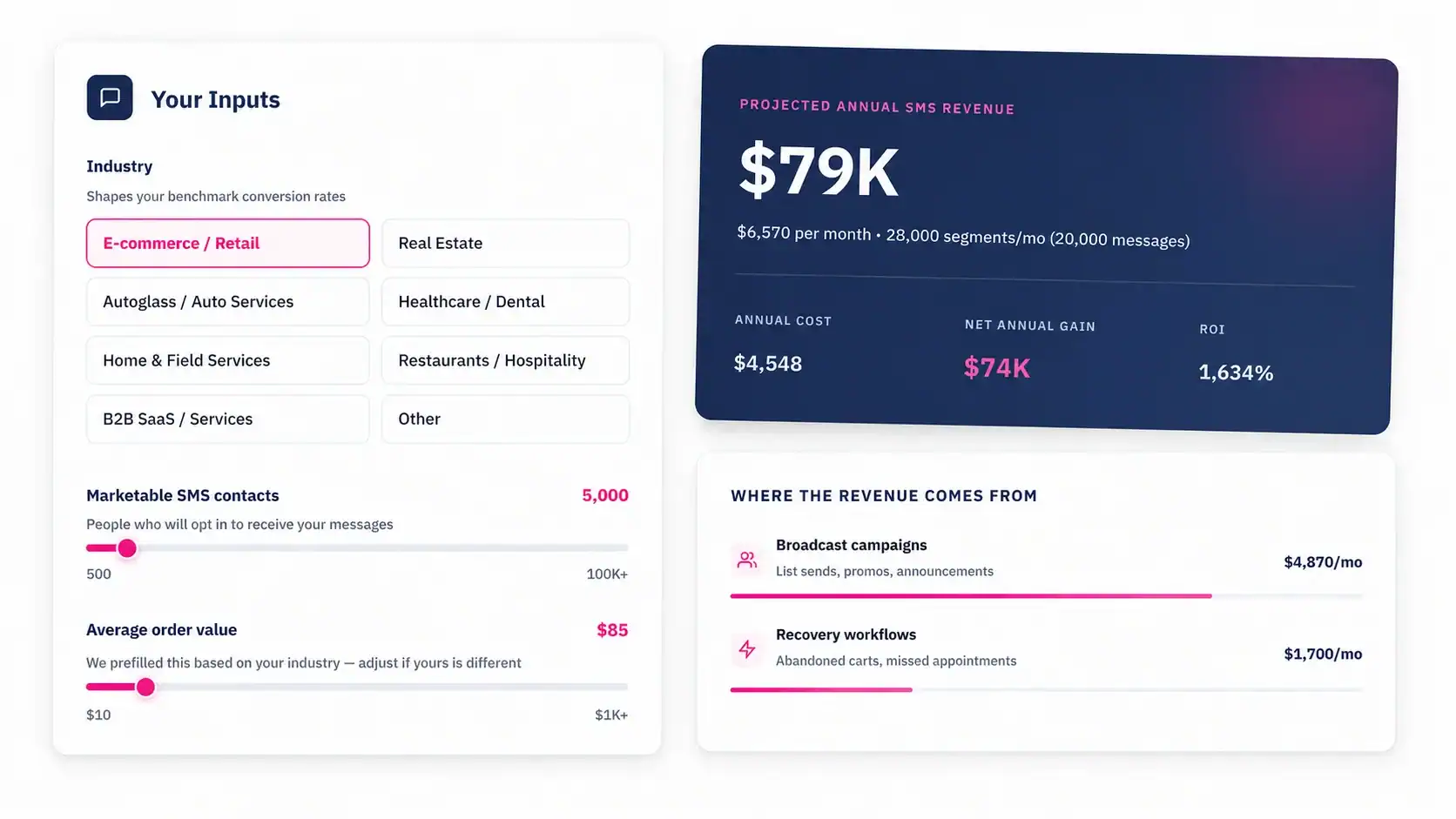
Start Sending Automated Mortgage Texts From HubSpot
If your follow-up process still depends on loan officers manually texting borrowers from their personal phones, you’re losing deals to whoever texted first. A mortgage CRM with SMS that runs inside HubSpot means every lead gets a response in under 90 seconds, every borrower gets a milestone update without anyone remembering to send it, and every reply lands in a shared inbox where your team can act on it.
MessageIQ is built by HubSpot Diamond Solutions Partners and starts at $49/mo. Every conversation is two-way, every opt-out syncs to HubSpot automatically, and the entire workflow setup lives inside the HubSpot workflow editor your team already knows.
See how the HubSpot SMS integration works and send your first automated mortgage text today.