

Most teams pick an SMS tool the same way they pick project management software: someone demos it, it looks clean, it connects to HubSpot, and it ships. Three months later the same team is manually managing opt-outs in a spreadsheet, wondering why half their messages aren’t delivering, and hitting a ceiling every time they try to personalize beyond a first name.
The problem usually isn’t the tool itself. It’s that enterprise teams evaluate SMS tools using consumer-grade criteria. Features that work fine for a 500-contact list start breaking at 50,000. Personalization that looks good in a demo turns out to be static merge fields with no CRM depth behind them.
This checklist covers the nine features that separate a real enterprise personalized text marketing tool from something you’ll be replacing in a year.
The 9-Feature Checklist
Feature 1: CRM-Native Personalization – Not Just a Data Sync
The most important question to ask any SMS vendor: does your tool read from our CRM directly, or does it maintain its own copy of contact data?
The distinction matters more than most teams realize. A tool that syncs data from your CRM operates on a snapshot that’s always slightly behind. You trigger a message based on a deal stage change, but the sync hasn’t fired yet. The message sends with last week’s data. The contact gets a text referencing a deal that closed two days ago.
CRM-native personalization means the tool reads from the live contact record at send time. Every custom property, every lifecycle stage, every deal field your team manages is available as a message variable without any middleware.
For HubSpot teams, MessageIQ’s approach solves this by operating as a native HubSpot feature rather than an integration. The SMS workflow action lives inside HubSpot’s workflow builder. Contact properties render as tokens directly from the live record. There’s no sync layer to maintain or troubleshoot.
What to check: Can you use any custom contact property as a personalization token? Do tokens pull from the live record at send time, or from a synced copy? Ask the vendor specifically.
Feature 2: Behavioral and Event-Based Triggers
A scheduled send is not personalization. Sending the same message to a segment every Tuesday at 10am is a broadcast with a merge field in it.
Real personalization at enterprise scale means your messages fire when something happens. A contact submits a demo request form. A deal moves to “Proposal Sent.” A lifecycle stage changes from Lead to Marketing Qualified Lead. An appointment reminder goes out 24 hours before a confirmed booking.
Event-based triggers are what make SMS feel timely and relevant rather than coincidental. A message that arrives 8 minutes after a prospect fills out your pricing page lands completely differently than one that arrives on a fixed schedule with no relationship to anything the contact actually did.
The triggers to verify before committing to any enterprise personalized text marketing tool:
- Form submission triggers (specific forms, not just any form)
- Deal stage change triggers (configurable per pipeline and stage)
- Lifecycle stage change triggers
- Contact property value change triggers (when a custom field updates to a specific value)
- Date-based triggers with dynamic offsets (X days before {{appointment_date}})
What to check: Ask the vendor to show you a workflow triggered by a custom contact property change. If they can’t demo that in 5 minutes, the trigger depth probably isn’t there.
Feature 3: Two-Way Messaging With a Shared Team Inbox
One-way SMS is a broadcast channel. Two-way SMS is a conversation channel. Enterprise teams need the latter, and they need it managed at team scale.
When a prospect replies to a triggered text, that reply needs to go somewhere actionable. A shared team inbox that multiple reps can see, claim, and respond from is the baseline. Without it, replies land in a black hole, get missed, or require someone to individually monitor a phone number.
The inbox also needs to log every conversation against the contact record automatically. A sales rep who picks up a conversation shouldn’t have to manually note in HubSpot that a reply came in. The tool should write that back to the contact timeline without any manual step.
98% of SMS messages are opened vs roughly 20% for email, which means your reply rate will be real. You need infrastructure to handle it, not just a “sent” status and a wave goodbye.
For a deeper look at how two-way SMS works in a B2B sales context, this breakdown for sales teams covers the inbox management piece specifically.
What to check: Does the shared inbox support conversation assignment to specific reps? Do replies automatically log to the CRM contact timeline? Can you see full conversation history alongside CRM contact data?
Feature 4: Automatic Opt-Out Compliance That Writes Back to Your CRM
This is the feature that most vendors wave past in demos and most buyers don’t think to verify until they have a problem.
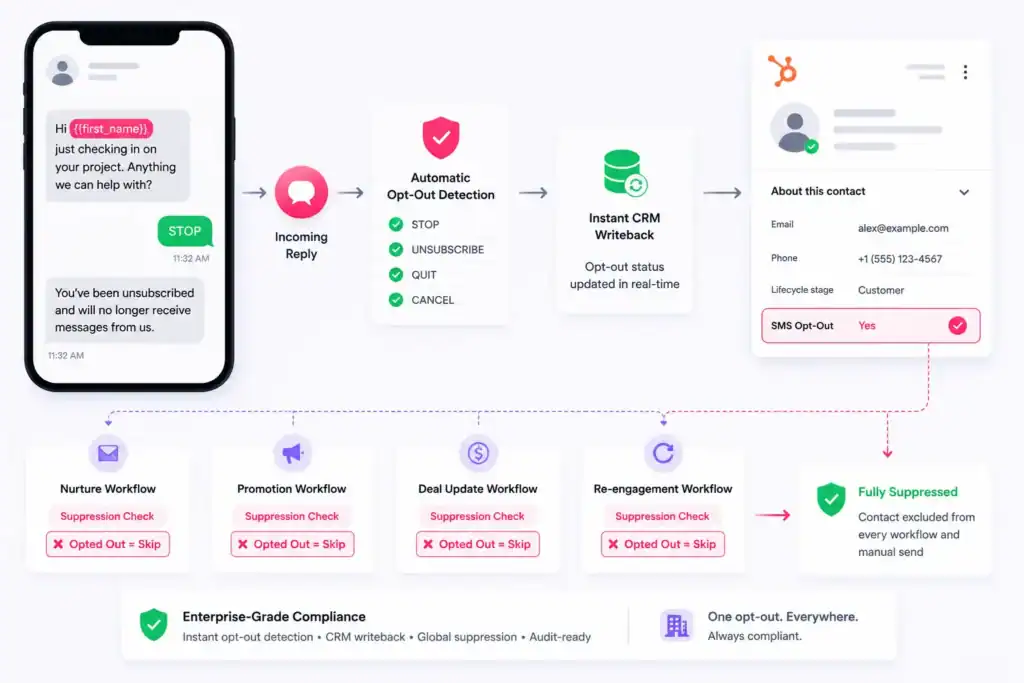
Here’s what proper opt-out compliance looks like at enterprise scale: a contact replies STOP. The tool instantly marks them as opted out. That opted-out status immediately updates a property on their CRM contact record. Every workflow in your system checks that property before sending. The contact never receives another message through any trigger, any workflow, or any manual send.
Most tools handle the first part – they stop sending to that number. Fewer handle the CRM writeback. And almost none handle the suppression check across all workflows automatically.
The gap between “we honor opt-outs” and “we instantly suppress opted-out contacts from every possible send path in your CRM” is where compliance problems live. At enterprise volume, a single workflow that doesn’t check the opt-out property before sending can generate dozens of violations before anyone notices.
What to check: When a contact replies STOP, which specific CRM property updates? Is it a property you can use as a suppression filter in every workflow? Does it cover UNSUBSCRIBE, QUIT, and CANCEL as well as STOP? Ask for a live demo of the full opt-out flow.
Feature 5: 10DLC Brand and Campaign Registration Support
A2P 10-digit long code (10DLC) registration is not optional for US business texting. Carriers filter unregistered traffic. Unregistered brands see significantly higher message blocking rates, and there’s no warning when it happens – messages just quietly stop delivering.
Every enterprise personalized text marketing tool worth evaluating handles brand and campaign registration as part of onboarding. Your brand gets registered with The Campaign Registry. Your specific use cases get registered as campaigns. Carriers whitelist your traffic accordingly.
The tools that don’t support this registration push the process onto you, which means navigating carrier requirements and TCR processes without guidance. Most teams either skip it entirely until something breaks, or spend weeks figuring out a process that a good tool handles in the background.
What to check: Does the vendor handle 10DLC registration for you, or do they give you documentation and send you off? Is brand and campaign registration included in the setup process, or is it a separate add-on? What happens to your messages if registration lapses?
Feature 6: Deliverability Infrastructure Beyond “Sent” Status
“Sent” means the message left your platform. It doesn’t mean it reached the phone.
Enterprise text marketing tools vary significantly in how much visibility they give you into what happens after a message leaves the platform. Carrier-level delivery confirmation tells you the message was accepted by the carrier and delivered to the handset. Without it, you’re looking at a sent count and assuming the rest.
The deliverability features worth verifying:
- Carrier-level delivery receipts: Confirmed delivery to the handset, not just the carrier gateway
- Filtering risk detection: Proactive flags when message content or sending patterns trigger carrier filters
- Volume scaling controls: Automatic throttling that spreads sends at rates carriers accept without flagging
- Dedicated number management: Consistent sender identity that builds carrier trust over time, not rotating numbers that reset it
IQ Advanced Delivery in MessageIQ handles the carrier confirmation layer specifically – it’s designed for teams where knowing a message was actually received matters as much as knowing it was sent.
What to check: What’s the difference between a “delivered” status and a “sent” status in their platform? Can they show you a delivery rate report broken down by carrier? Ask what happens when a message gets filtered.
Feature 7: Analytics Connected to Revenue Outcomes
Delivery rate, click-through rate, and reply rate tell you how your messages performed in isolation. They don’t tell you whether SMS is actually contributing to pipeline.
Enterprise teams need to connect SMS activity to outcomes: how many replies converted to booked meetings, how many message sequences influenced a deal, how many contacts re-engaged after an SMS follow-up that had gone cold over email. That connection is what justifies the tool to a CFO and what tells your team which workflows are worth scaling.
The analytics to look for:
- Reply rate by workflow or campaign (not just overall)
- Conversion tracking from SMS reply to meeting booked or deal stage moved
- Contact-level message history alongside CRM deal data
- A/B testing on message copy with outcome-based winning criteria, not just open rates
What to check: Can you pull a report showing SMS-influenced pipeline? Can you see which specific workflow or message triggered a reply that turned into a booked demo? If the answer is “you’d need to cross-reference that manually,” the analytics aren’t enterprise-grade.
Feature 8: Role-Based Access and Team Management
A single rep sending texts from a personal number is a completely different operational model than 40 reps across 6 territories all running SMS workflows from a shared HubSpot instance.
Enterprise tools need to support the second model. That means:
- Inbox assignment: Conversations routed to the right rep based on contact ownership in the CRM
- Role-based permissions: Marketing can build campaigns, sales reps can respond to inbound, admins can manage settings – none of those roles step on each other
- Conversation visibility controls: Team leads can see all conversations across their team without seeing conversations outside their scope
- Audit trails: A log of who sent what and when, useful for compliance reviews and performance management
The absence of role-based controls isn’t just an operational inconvenience – it’s a compliance risk. If every rep in your organization can send any message to any contact, your opt-out management and consent tracking becomes very difficult to audit.
What to check: Can you assign conversations to specific reps based on CRM contact ownership? Are there permission levels that restrict what different user roles can see and do? Can you pull a send history by user?
Feature 9: Volume Scalability on a Single Business Number
When enterprise teams hit volume limits on an SMS tool, the common workaround is to rotate across multiple phone numbers. Don’t accept this as normal.
Number rotation creates real problems. Your contacts start receiving texts from numbers they don’t recognize. Carrier trust built on one number doesn’t transfer to a new one. Opt-outs on one number don’t automatically apply to another unless your suppression logic is airtight across all of them. Your brand identity fragments across however many numbers you’re running.
A purpose-built enterprise personalized text marketing tool handles volume scaling on a single business number through intelligent send throttling and carrier-compliant pacing. Your contacts always see the same number. Carrier trust compounds over time. Opt-out management is clean because there’s only one number to manage.
MessageIQ’s IQ Autoscaling handles this specifically: high-volume sends run through the platform’s infrastructure on your business number without triggering carrier filters, and without requiring you to manage a pool of rotating numbers.
What to check: What’s the maximum daily send volume on a single number? How does the platform handle volume spikes? Ask directly whether number rotation is required at your expected monthly volume.
Get Your Ultimate HubSpot Text Messaging Playbook for FREE
Discover how top HubSpot teams use SMS to boost engagement, close deals faster and streamline operations.
Instant download
Expert insights from certified HubSpot professionals
Ultimate Text Messaging Playbook
How to Use This Checklist
Run every vendor through all nine points before you commit. The features that look like nice-to-haves in a demo become critical infrastructure once you’re running real campaigns at scale.
A few of these – opt-out compliance writing back to the CRM, 10DLC registration support, and volume scalability on a single number – are worth treating as hard requirements. If a vendor can’t demonstrate all three cleanly, the operational and compliance cost of working around the gaps will outweigh whatever the tool saves you.
The full picture of how these features work inside a HubSpot-native setup is worth reviewing before finalizing any decision. Comparing the leading HubSpot SMS tools side by side covers how the major options stack up specifically for HubSpot teams.
See how much revenue SMS could add to your HubSpot stack
Five inputs. Industry-backed benchmarks. Get your projected annual SMS revenue in under 30 seconds.
Calculate My SMS ROI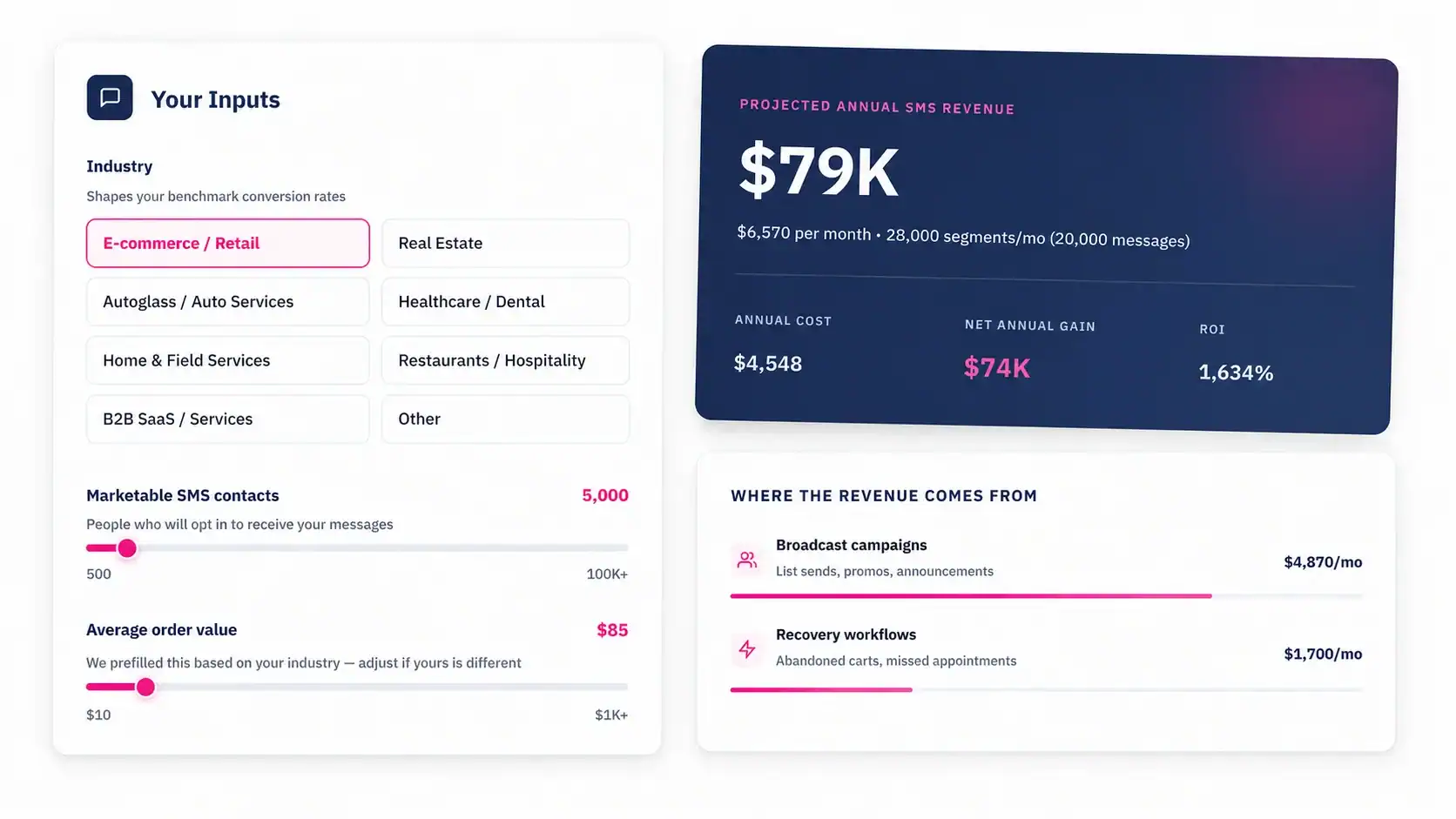
A Note on CRM-Native vs. Connected Tools
This checklist applies to any enterprise personalized text marketing tool, but the evaluation gets simpler when you’re running HubSpot. The features above are most naturally satisfied by a tool built inside your CRM rather than connected to it.
A connected tool requires you to verify data sync reliability, check that trigger events fire in both directions, confirm that opt-outs write back correctly, and maintain a second platform alongside HubSpot. A native tool – one that operates as a HubSpot workflow action, contact record widget, and list-based audience system – checks most of these boxes structurally because there’s no integration layer to fail.
If your team is on HubSpot and you want to see what the native architecture actually looks like in practice, the HubSpot SMS integration page walks through exactly how MessageIQ works inside the CRM rather than beside it.
FAQ
What should I look for in an enterprise personalized text marketing tool?
The nine features that matter most at enterprise scale are: CRM-native personalization, behavioral and event-based triggers, two-way messaging with a shared team inbox, automatic opt-out compliance that writes back to your CRM, 10DLC registration support, deliverability controls beyond sent status, revenue-connected analytics, role-based access and team management, and volume scalability on a single business number. A tool that checks all nine works across your whole team at real volume, not just for controlled demos.
What’s the difference between a bulk SMS tool and an enterprise personalized text marketing tool?
A bulk SMS tool sends the same message to a large list. An enterprise personalized text marketing tool pulls live data from your CRM into every message individually and triggers sends based on real contact activity rather than a fixed schedule. Replies flow back to a shared inbox connected to your CRM, so every conversation is tracked and actionable rather than landing in a void.
Does an enterprise SMS tool need to handle TCPA compliance automatically?
Yes. Any enterprise team texting at scale needs automatic opt-out handling that writes back to the CRM contact record and suppresses that contact from all future sends immediately. Manual opt-out management at enterprise volume creates compliance gaps that are difficult to audit and expensive to remediate. The right tool handles STOP, UNSUBSCRIBE, QUIT, and CANCEL replies automatically and logs every opt-out with a timestamp against the contact record.
How important is CRM integration for an enterprise text marketing tool?
It’s the most important factor on the list. Personalization only works as deep as your data goes, and your deepest contact data lives in your CRM. A tool that connects through a third-party bridge introduces sync delays, limits which properties you can use as triggers, and creates a second system to maintain. A CRM-native tool eliminates the integration layer entirely, which means your personalization tokens always pull from current data and your triggers fire from real CRM events.
What is 10DLC and why does my enterprise SMS tool need to support it?
10DLC stands for 10-digit long code. It’s the US carrier standard for A2P (application-to-person) business texting. Every business sending SMS in the US needs to register their brand and message campaigns with carriers through the 10DLC process. Tools that don’t support this leave you texting on unregistered traffic, which carriers actively filter without warning. Your enterprise SMS tool should handle brand and campaign registration as part of its onboarding process, not leave it to you.
Your Current Tool Either Has These Features or It Doesn’t
There’s no partial credit on most of the items above. Either opt-outs write back to the CRM automatically or they don’t. Either triggers fire from live CRM events or they fire from synced snapshots. Either your team has a shared inbox or replies are going somewhere no one is checking.
The good news: a tool that checks all nine of these boxes doesn’t have to be expensive or complex to implement. MessageIQ covers every item on this checklist inside HubSpot, starting at $29/mo with every feature included on every plan. See how it connects to your HubSpot and run it against your own checklist.