

Your sales rep texts a prospect a link to the proposal. The prospect clicks it within 4 minutes of receiving the text. Nobody on the rep’s team knows because the SMS platform doesn’t write click data back to HubSpot, so the buying signal disappears into a black hole. The rep follows up three days later, not realizing the prospect already reviewed the document.
HubSpot SMS link tracking solves that problem. When it’s set up correctly, a contact clicking a link inside an SMS message fires a data point to their HubSpot contact record, can trigger a workflow, and feeds into your campaign attribution reporting through UTM parameters. This guide covers all three layers click tracking, workflow triggers, and UTM attribution and how Message IQ writes that data back to HubSpot natively, without manual attribution work or separate analytics dashboards.
What Is HubSpot SMS Link Tracking?
HubSpot SMS link tracking is the ability to detect and log when a contact clicks a link sent inside a text message, and to surface that click data inside HubSpot where your team can act on it. It operates differently from email link tracking there’s no tracking pixel in SMS, so click detection happens through redirected short links that pass through a tracking layer before landing the contact on the destination URL.
There are three distinct things teams mean when they search for HubSpot SMS link tracking:
- Contact-level click logging: Did this specific contact click the link in this SMS, and when? This appears on the contact’s activity timeline.
- Workflow trigger on click: When a contact clicks a link in an SMS, automatically fire a follow-up action inside HubSpot notify a rep, update a contact property, send another message, move a deal stage.
- UTM attribution: Tag the links inside your SMS with UTM parameters so HubSpot’s traffic analytics and campaign reporting correctly sources website visits and form fills back to your SMS campaign rather than attributing them to ‘direct’ or ‘other’.
Most SMS platforms handle one of these three. Message IQ, running natively inside HubSpot, handles all three click data logs to the contact record, workflow triggers fire on clicks, and UTM-tagged links pass source attribution through to HubSpot’s traffic analytics.
See how much revenue SMS could add to your HubSpot stack
Five inputs. Industry-backed benchmarks. Get your projected annual SMS revenue in under 30 seconds.
Calculate My SMS ROI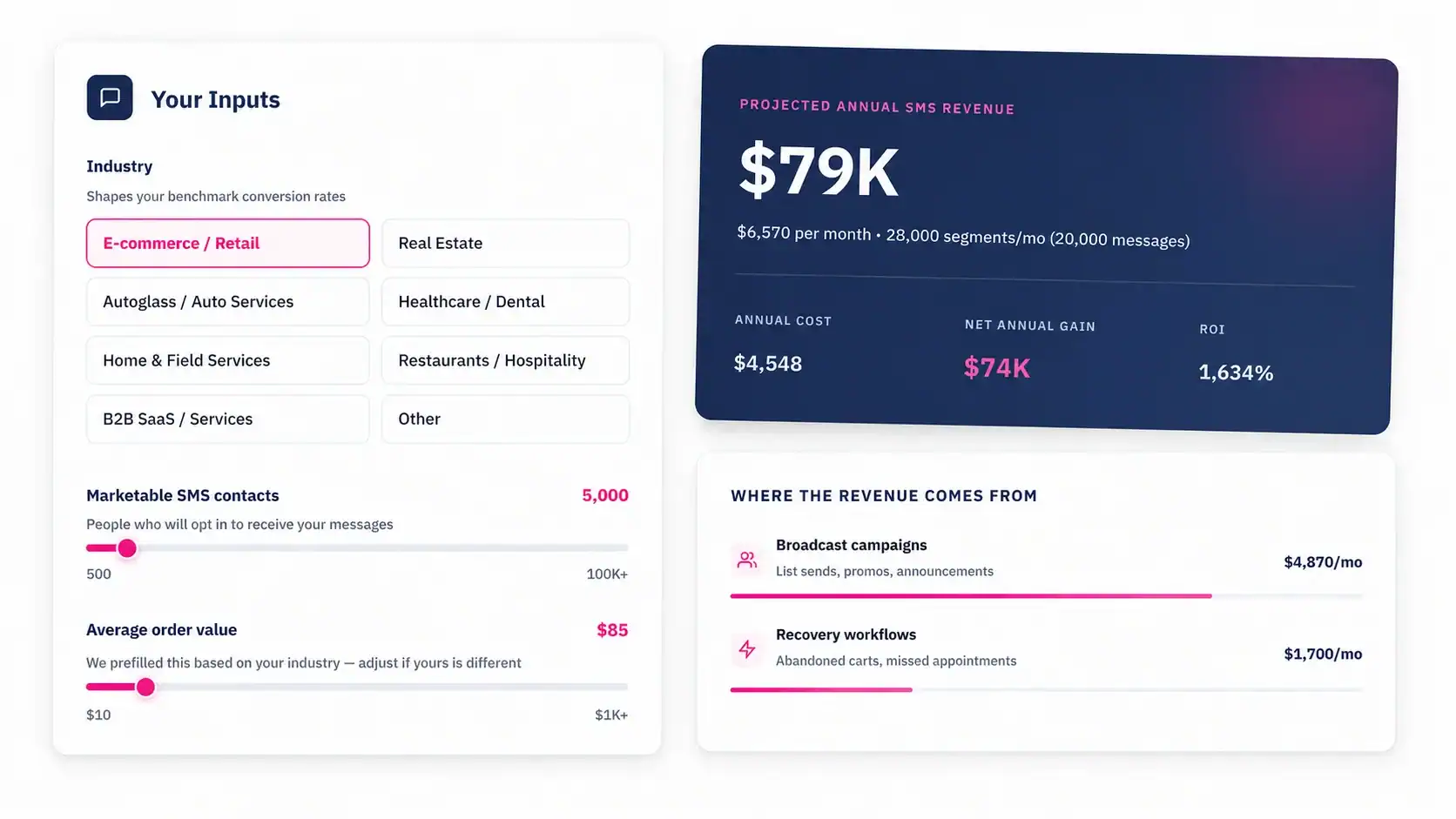
Layer 1: Contact-Level SMS Click Tracking
How SMS Link Tracking Works Technically
Unlike email, SMS messages can’t embed a pixel. Click tracking in SMS works through link wrapping your SMS platform replaces the destination URL in your message with a short tracking link that routes through the platform’s servers before redirecting to the target page. When the contact taps the link, the redirect registers the click (contact ID, timestamp, URL clicked) before passing them through to the destination.
The key question for HubSpot users is what happens to that click data after it’s registered. With a generic SMS tool connected to HubSpot through Zapier, the click data might stay inside the SMS platform’s own dashboard and never surface in HubSpot. With a natively integrated platform like Message IQ, the click event writes back to the contact’s HubSpot activity timeline in real time same as an email click or a page view.
What Click Data Looks Like on the Contact Timeline
When Message IQ tracks a link click inside an SMS, the contact’s HubSpot timeline shows:
- The SMS message that contained the link
- The timestamp of the click
- The URL that was clicked
- The number of times that link was clicked from that message
A rep opening a contact record can see at a glance that the prospect clicked the pricing page link in Tuesday’s text at 2:17pm, clicked it again at 4:45pm, and hasn’t replied yet. That’s a buying signal the rep acts on immediately not three days later when they send a generic follow-up.
Setting Up SMS Link Tracking in Message IQ
- Install Message IQ from the HubSpot App Marketplace and complete 10DLC registration so your messages deliver.
- In Message IQ settings, enable link tracking. This tells the platform to wrap any URLs included in outbound SMS messages with tracked redirect links.
- Write your SMS either manually from the contact record sidebar or inside a HubSpot workflow using the Message IQ Send SMS action. Include the destination URL in the message body.
- Message IQ automatically wraps the URL in a tracked short link before sending. The recipient sees a clean short link, taps it, and gets redirected to your destination URL.
- The click registers against the contact’s record. The event appears on their HubSpot activity timeline and is available as a filter in workflows, lists, and reports.
Layer 2: Triggering HubSpot Workflows on SMS Link Clicks
This is the use case with the highest sales impact and the lowest adoption rate. Most teams know they can trigger HubSpot workflows on email link clicks. Far fewer realize they can do the same thing on SMS link clicks and the behavioral signal from an SMS click is actually stronger, because the conversion path is shorter and more intentional.
When a prospect clicks a link in an email, it could be an accidental tap, a bot, or a genuine review.
When a prospect clicks a link in a text message, they unlocked their phone, opened the SMS app, read the message, tapped the link, and loaded the page. That’s a deliberate action. It’s a stronger buying signal than almost any email engagement event.
Building a Click-Triggered Workflow in HubSpot with Message IQ
Here’s the workflow architecture for a proposal follow-up sequence triggered by an SMS link click:
- Create a contact-based workflow in HubSpot. Set the enrollment trigger to ‘Message IQ: SMS Link Click URL contains [your proposal URL]’.
- Add a Time Delay: 0 minutes (fire immediately on click detection).
- Add a HubSpot Create Task action: assign the deal owner a task titled ‘Prospect clicked proposal link in SMS follow up now’ with a 2-hour due date.
- Add an internal notification: send a Slack or email alert to the deal owner with the contact name, which link was clicked, and the timestamp.
- Add an If/Then Branch: ‘If Deal stage is Proposal Sent’ Yes path: update deal stage to ‘Negotiation’ and send a Message IQ follow-up SMS. No path: log the click and notify the owner only.
- Add a stop condition: ‘If contact has submitted a form on the pricing page’ indicating the prospect converted, so the sequence can exit.
The rep gets notified the moment the prospect clicks the proposal link. They have context which link, when, how many times. The deal stage updates automatically. The follow-up text fires without any manual action. A click that would have gone unnoticed now triggers a coordinated response within minutes.
Other High-Value Click-Trigger Workflows
| SMS Link Clicked | Workflow Action | Why It Works |
|---|---|---|
| Pricing page link | Notify deal owner + move deal stage to Negotiation | Pricing review is the strongest pre-close signal |
| Case study or testimonial link | Add to ‘High Intent’ list + send follow-up SMS with next step | Content engagement indicates active evaluation |
| Booking/calendar link | Update contact property ‘Meeting Requested = Yes’ + assign task | Confirms intent to meet without waiting for booking confirmation |
| Product demo video link | Enroll in demo follow-up sequence via SMS + email | Video click = product interest at research stage |
| Proposal PDF link | Alert deal owner + update last activity date on deal | Proposal review = procurement stage signal |
| Unsubscribe/opt-out link | Remove from all SMS workflows + log to contact record | Compliance — must be honored immediately |
Layer 3: UTM Attribution for HubSpot SMS Campaigns
Without UTM parameters on your SMS links, every contact who clicks through to your website from a text message shows up in HubSpot as ‘Direct’ traffic. Your marketing reports don’t know SMS drove the visit. Your campaign ROI calculations are wrong. Your team underestimates the channel because the attribution data doesn’t exist.
UTM parameters fix this by tagging the destination URL with source, medium, and campaign data that HubSpot’s tracking code reads when the visitor lands on your page.
UTM Structure for HubSpot SMS Campaigns
Use this structure for links sent through Message IQ SMS campaigns. Keep the parameters consistent across all sends so your HubSpot traffic analytics aggregate correctly.
| UTM Parameter | Recommended Value | What HubSpot Reports On |
|---|---|---|
| utm_source | sms | Source in Traffic Analytics identifies SMS as the channel |
| utm_medium | text | Medium distinguishes from email, paid, organic |
| utm_campaign | campaign-name (e.g. proposal-followup-june) | Campaign performance in Traffic Analytics |
| utm_content | link-descriptor (e.g. pricing-link, demo-cta) | Which specific link drove the click useful for A/B testing |
| utm_term | Optional — segment or audience label | Contact segmentation e.g. enterprise vs smb |
How HubSpot Sources the Visit
When a contact clicks your UTM-tagged SMS link and lands on a page with the HubSpot tracking code installed, HubSpot reads the UTM parameters and writes them to the contact’s ‘Latest Source’ properties. If the contact then fills out a form, converts on a landing page, or starts a chat, that conversion gets attributed to your SMS campaign in HubSpot’s contact source data.
One important limitation: HubSpot only writes UTM data to a contact’s source properties if the visitor is cookied in the browser. A contact clicking an SMS link on mobile and landing on your site for the first time won’t have a HubSpot cookie set yet their first visit will be attributed to the UTM source correctly, but subsequent direct visits won’t retain the SMS attribution. This is expected behavior and applies to all marketing channels, not just SMS.
Building a UTM-Tagged SMS Link in Message IQ
- Build your destination URL with UTM parameters appended (using Google’s Campaign URL Builder or HubSpot’s UTM builder in Marketing > Social > UTM Codes).
- Paste the full UTM-tagged URL into your Message IQ message template or workflow SMS action.
- Message IQ wraps it in a tracked redirect link before sending so the recipient sees a short link, the platform registers the click against the contact, and the destination URL retains the UTM parameters when the contact arrives.
- In HubSpot, go to Reports > Traffic Analytics > Sources. Filter by Source = ‘Other Campaigns’ and look for utm_source = sms to see aggregate SMS-driven traffic.
- For campaign-level reporting, go to Marketing > Campaigns, associate your SMS sends with a campaign, and view clicks, contacts, and conversions attributed to that campaign.

Turn HubSpot Into A Real-Time SMS Engine with Message IQ
 Two-Way Conversations
 Shared Team Inbox
 Automation Triggers
 Advanced Reporting
 Compliance Tools
- 98% SMS read within 3 min
- 78% Buy from first responder
- 21× More likely to qualify

*MessageIQ is an Integrate IQ product built natively for HubSpot by the same team.
Link Shorteners in SMS: What to Use and What to Avoid
SMS has a character limit and long UTM-tagged URLs eat into it fast. Link shorteners solve the character problem but introduce two new ones: carrier filtering and brand trust.
Never use generic public link shorteners like bit.ly or tinyurl in business SMS. Carriers flag messages containing public shortener domains as potential spam because bad actors abuse them. Your messages may get filtered before they reach the recipient undoing all the compliance work your 10DLC registration was supposed to solve.
| Link Type | Carrier Risk | Recommended? |
|---|---|---|
| bit.ly / tinyurl | High flagged as spam indicator | No |
| Full UTM URL (unshortened) | Low but consumes character count | Only for short URLs |
| Message IQ tracked short link | Low platform-managed domain | Yes default behavior |
| Branded short domain (e.g. go.yourdomain.com) | Lowest recognized sender domain | Yes best practice for campaigns |
Message IQ handles link shortening automatically through its own platform-managed domain not a public shortener. The tracked redirect preserves both the click data for HubSpot and the UTM parameters for attribution, without triggering carrier filters. For high-volume campaigns, a branded short domain (e.g. go.yourcompany.com) adds an additional layer of deliverability confidence because the domain matches your registered brand.
How Message IQ Handles SMS Link Tracking for HubSpot Teams
Most SMS platforms that connect to HubSpot through Zapier or API keep their click data inside their own dashboard. Your team has to log into a separate tool to see who clicked what, then manually cross-reference with HubSpot contact records. That’s a workflow that gets skipped.
Message IQ writes click data back to HubSpot natively because the integration runs inside HubSpot’s native app infrastructure, not through a middleware layer. Every click event shows up on the contact’s activity timeline alongside emails, calls, and notes where your reps already work.
- Click data logs to the contact record in real time no sync delay, no manual export
- Link clicks are available as workflow enrollment triggers ‘Contact clicked SMS link containing [URL]’
- UTM parameters pass through tracked links to HubSpot’s traffic analytics and campaign attribution
- Click counts appear on the contact timeline so reps know if a prospect clicked the proposal link once or five times
- Opt-out link clicks are handled automatically STOP and opt-out link clicks remove the contact from future sends and log the opt-out to the contact record
The result is SMS link tracking that behaves the same way email link tracking does in HubSpot visible on the record, triggerable in workflows, reportable in dashboards without a separate analytics layer to manage.
Frequently Asked Questions
Does HubSpot natively track link clicks in SMS messages?
HubSpot’s Marketing Hub SMS add-on includes basic click tracking for SMS messages sent through HubSpot’s native SMS tool. For teams using a third-party SMS platform like Message IQ, click tracking works through the SMS platform’s link wrapping system, with click events written back to the HubSpot contact timeline via the native integration. The result is the same click data on the contact record but the mechanism runs through the connected app rather than HubSpot’s core.
Can I trigger a HubSpot workflow when a contact clicks a link in an SMS?
Yes, with a natively integrated SMS platform like Message IQ. Once the integration is active, ‘Message IQ SMS Link Click’ becomes available as a workflow enrollment trigger inside HubSpot’s contact-based workflow builder. You can filter by specific URL, URL pattern, or click count so a workflow can fire when a contact clicks your proposal link but not on every generic link tap.
Do UTM parameters work in SMS links?
Yes. Any URL included in an SMS can carry UTM parameters. When the contact clicks the link and arrives on a HubSpot-tracked page, the UTM data writes to their contact source properties. For SMS, the recommended UTM structure is utm_source=sms, utm_medium=text, utm_campaign=[campaign name], utm_content=[link identifier]. Message IQ wraps UTM-tagged URLs in tracked short links before sending, preserving both the click data and the attribution parameters.
Why should I avoid bit.ly or public link shorteners in SMS?
Carriers flag messages containing public shortener domains as a spam indicator because bad actors use them to mask malicious destinations. Messages with bit.ly or tinyurl links can get filtered before reaching the recipient even if your number is 10DLC registered and your content is compliant. Use your SMS platform’s built-in link shortener (platform-managed domain) or a branded short domain tied to your registered website for SMS campaigns.
How many characters does a tracked SMS link use?
Message IQ’s tracked short links typically resolve to 20–25 characters, regardless of how long the original UTM-tagged URL is. A standard 160-character SMS message with a 25-character tracked link leaves 135 characters for your message content enough for a clear, personalized message with your company name and opt-out language included.
Can I see how many times a prospect clicked an SMS link?
Yes. Message IQ logs click count alongside the click event on the contact’s HubSpot timeline. If a prospect clicks the same link three times across different message sessions, each click appears with its timestamp. You can also filter contacts in HubSpot by ‘SMS link click count greater than 1’ to identify high-engagement prospects who are actively revisiting your content but haven’t replied yet.
Get 300+ SMS Templates
Enter your details to download the PDF instantly.
Download Started!
Your 300+ SMS Templates PDF is downloading now. If it didn’t start, click here.
Turn SMS Link Clicks Into Pipeline Actions
A prospect clicking your proposal link in a text is one of the highest-intent signals in your pipeline. Message IQ makes that signal visible on the HubSpot contact record, triggerable in workflows, and attributable in campaign reporting without a separate analytics tool or manual cross-referencing. The click logs where your team already works, and the workflow fires before the prospect loses momentum. Two-way by default, 10DLC registration handled during onboarding, plans starting at $99/month.
See how Message IQ extends HubSpot SMS across the full pipeline