
HubSpot’s App Marketplace lists more than 60 SMS apps. Most won’t survive a serious evaluation, a handful are genuinely built for HubSpot, and the right one for your team depends heavily on what you’re trying to do with SMS in the first place. A sales team running high-volume outbound has almost nothing in common with a healthcare practice sending appointment reminders, and a single ranked list treating them the same is how teams end up with the wrong tool.
This guide ranks 9 of the best SMS marketing software for HubSpot, organized by use case. Instead of a single top-to-bottom ranking, each tool wins a specific category where it’s the strongest fit. Every pricing claim and rating citation links to a primary source, and every tool entry includes who it’s not for, because a good evaluation is as much about ruling tools out as ruling them in.
Our evaluation covered native HubSpot integration depth, two-way conversation support, workflow automation, compliance features, deliverability, pricing transparency, and user ratings from G2, Capterra, and the HubSpot Marketplace.
How we evaluated these tools
We reviewed each tool against seven criteria that matter most for HubSpot-first teams. These shaped every “Best for” category assignment below.
- Native HubSpot integration depth. Does the tool install as a HubSpot Marketplace app with SMS as a native workflow action, or does it connect through Zapier or a raw API? Native depth determines how much setup and maintenance you own.
- Two-way conversation support. Can your team send and receive texts, with replies logged on the HubSpot contact record? Or is the tool a one-way broadcast engine?
- Workflow automation. Can you trigger SMS from HubSpot workflows the same way you trigger email? Can you branch, wait, and re-enroll based on replies?
- Compliance features. Built-in A2P 10DLC registration support, automatic STOP keyword handling, and opt-out properties that write back to the HubSpot contact record. Compliance gaps become legal risk at scale.
- Deliverability. Direct carrier relationships, transparent reporting on delivery status, and the ability to actually get messages through, not just send them.
- Pricing transparency. Clear base pricing, predictable scaling, no surprise per-message fees buried in the fine print.
- User ratings. Star ratings and review counts from G2, Capterra, and the HubSpot Marketplace, cited with source links. Newer tools with smaller review counts are flagged honestly.
See how much revenue SMS could add to your HubSpot stack
Five inputs. Industry-backed benchmarks. Get your projected annual SMS revenue in under 30 seconds.
Calculate My SMS ROI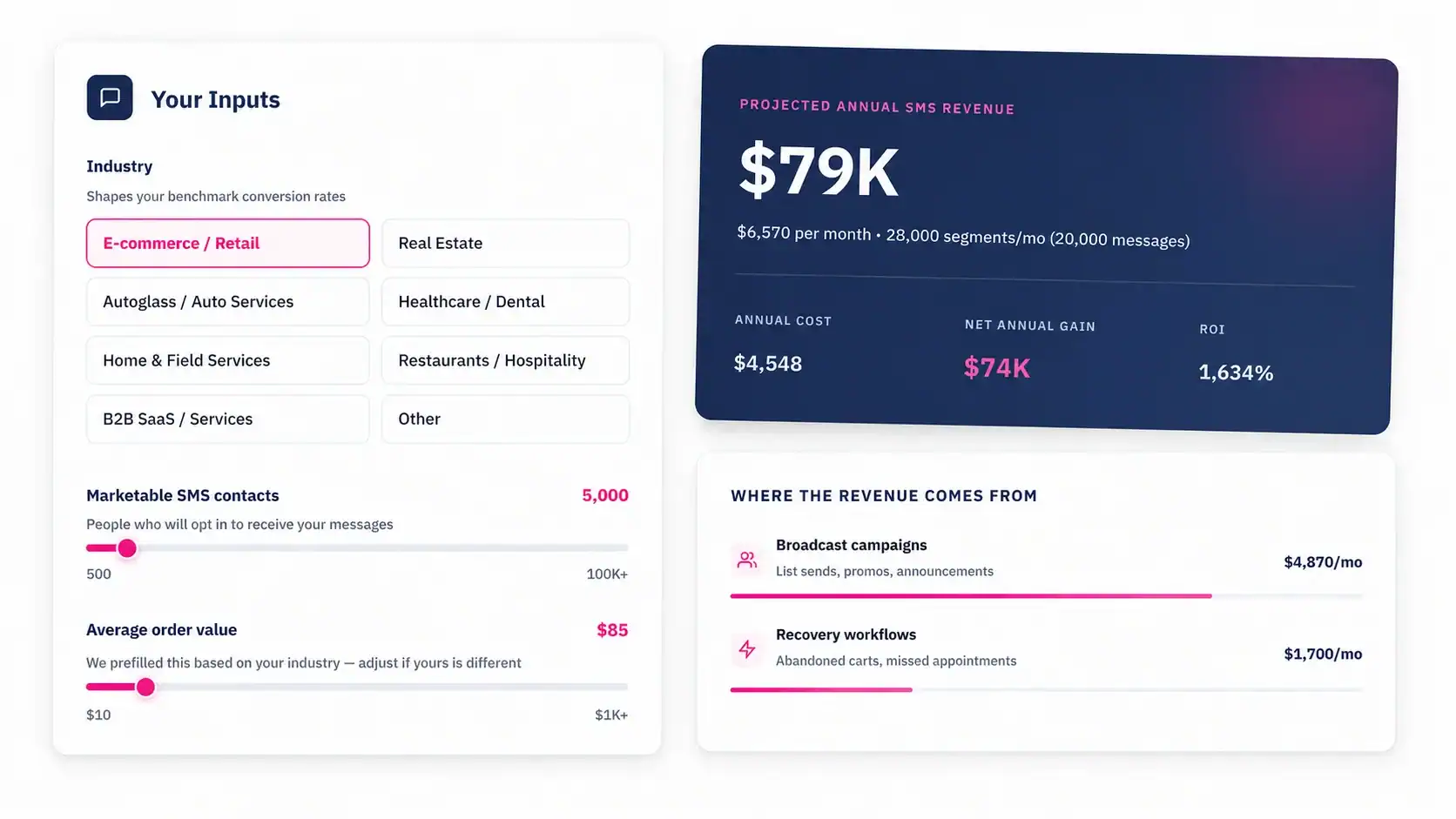
SMS marketing tools for HubSpot at a glance
Here are the 9 tools covered in this guide, with the use case each one wins, starting price, integration depth, and public rating at the time of writing. Full breakdowns follow below.
| Tool | Best for | Starting price | HubSpot integration | Rating |
|---|---|---|---|---|
| MessageIQ | Deep HubSpot integration | $29/mo | Native | HubSpot Marketplace (newer listing) |
| Salesmsg | High-volume sales outbound | $25/mo | Native | 4.6/5 G2 (230+ reviews) |
| Heymarket | SOC2/HIPAA omnichannel | $19/user/mo | Native | 4.7/5 G2 |
| Sakari | Global / international SMS | $25/mo | Native | 4.6/5 G2 |
| Textline | Customer support texting | $59.97/mo | Native | 4.7/5 Trustpilot |
| TextUs | Sales with compliance focus | Custom pricing | Native | 4.4/5 G2 |
| EZ Texting | Plug-and-play bulk campaigns | $25/mo | Native | 4.4/5 GetApp |
| SimpleTexting | Team texting with integrations | $39/mo | Native + Zapier | 4.6/5 G2 |
| Twilio | Developer-built custom SMS | $0.008/SMS | API only | 4.3/5 G2 |
Pricing and ratings shift. Before purchasing, verify each vendor’s current pricing page and review profile.
1. MessageIQ: Best for deep HubSpot integration

MessageIQ is a two-way SMS platform built HubSpot-first. SMS appears as a native action inside HubSpot Workflows, conversations log automatically to the contact record, and the install creates its own Active Lists and custom properties so your team isn’t configuring anything by hand.
Key features
- Native HubSpot Workflow action, sitting next to email as a workflow step
- Two-way conversations logged on the HubSpot contact timeline
- HubSpot personalization tokens supported inside SMS body
- Auto-created Active Lists and custom contact properties on install, including an opt-out property that updates when a contact replies STOP
- Direct carrier relationships for deliverability, with autoscaling on one phone number (the IQ Number)
Pricing
Starts at $29 per month, month-to-month, no long-term contracts. 30-day money-back guarantee. See MessageIQ’s pricing for current plans.
Rating
Listed on the HubSpot Marketplace. Honestly, this is a newer listing with a smaller review count than Salesmsg or Heymarket, so a star rating isn’t yet displayed per HubSpot’s 10-review minimum policy.
Who it’s best for
HubSpot users who want SMS to behave like a first-class HubSpot feature. Mid-market marketing, sales, and service teams running on Marketing Hub Professional or higher. Teams that care about deliverability being solved inside the product, not bolted on.
Who it’s NOT for
Teams outside HubSpot. International senders (MessageIQ is US and Canada only). Teams that need enterprise-tier SLAs or SOC2/HIPAA-certified handling. MessageIQ doesn’t advertise those certifications, so ask for specifics if compliance certifications are required.
2. Salesmsg: Best for high-volume sales outbound
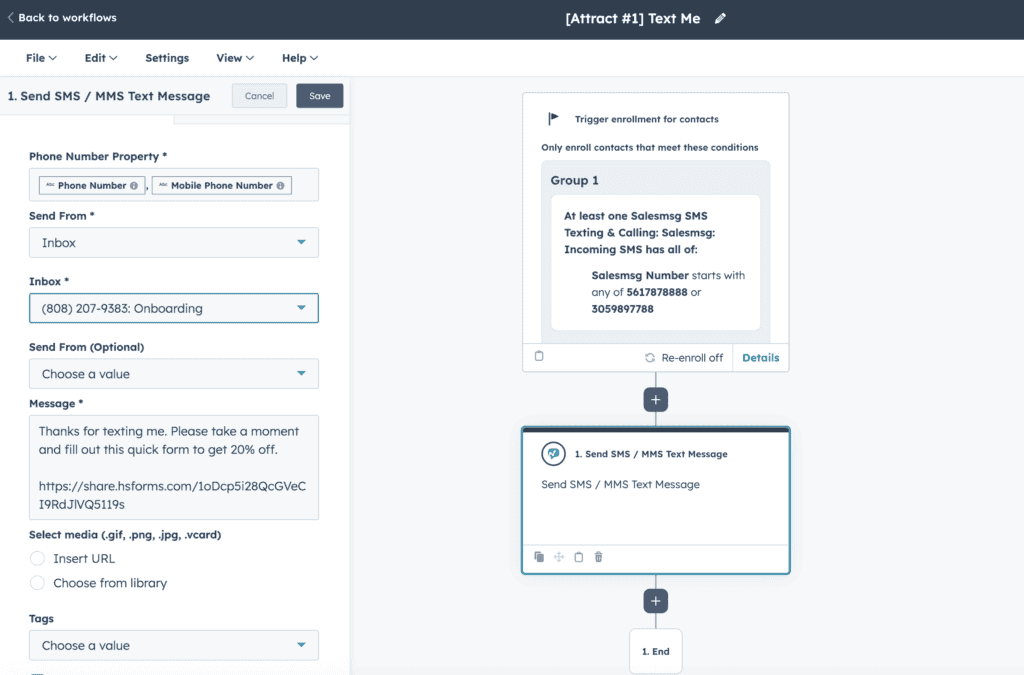
Salesmsg is a sales-focused bi-directional SMS and calling platform with deep HubSpot integration. It combines texting and calling in one interface, which sales teams running outbound cadences often prefer over two separate tools.
Key features
- One-to-one and bulk SMS directly from HubSpot contact records
- SMS automation triggered through HubSpot workflows
- Power Dialer for high-volume calling
- AI Agents for automated conversations and round-robin routing
- HubSpot-native integration for campaign triggers and contact sync
Pricing
Starts at $25 per month for 500 credits. See Salesmsg’s pricing page for current tiers.
Rating
4.6 out of 5 on G2 based on 230+ reviews. One of the most-reviewed HubSpot SMS apps.
Who it’s best for
Sales teams running high-volume outbound where calling and texting sit in the same workflow. Teams that value a mature product with a large review base. Organizations that have standardized on HubSpot for revenue operations.
Who it’s NOT for
Pure marketing teams that don’t need calling features will pay for capabilities they won’t use. Teams outside the US and Canada. Teams with tight per-user budgets, since pricing scales by user seat and credits at higher tiers.
3. Heymarket: Best for SOC2/HIPAA omnichannel messaging
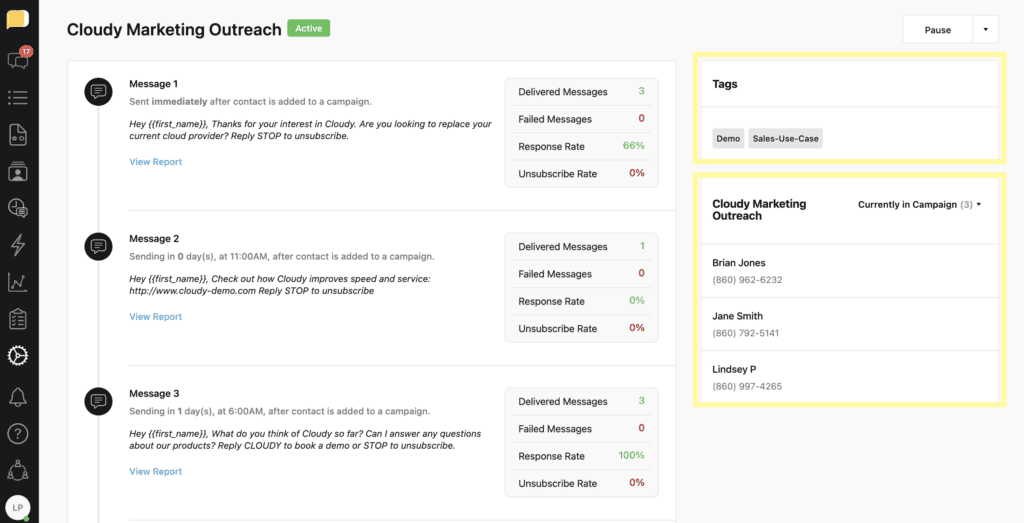
Heymarket is an omnichannel business messaging platform supporting SMS, MMS, WhatsApp, Facebook Messenger, and Instagram, all in a shared inbox with HubSpot integration. Its compliance posture (SOC2 and HIPAA) makes it a common pick for regulated industries.
Key features
- Shared inbox covering SMS, MMS, and major chat channels
- Automated SMS workflows triggered by HubSpot form submissions or lifecycle stage changes
- Real-time contact and conversation sync to HubSpot
- SOC2 Type II and HIPAA compliance
- Team messaging with roles, permissions, and assignment routing
Pricing
Starts at $19 per user per month. See Heymarket’s pricing for current tiers.
Rating
4.7 out of 5 on G2, with 1,500+ customers according to the company’s own reporting.
Who it’s best for
Healthcare providers, financial services firms, legal practices, and other teams with compliance requirements that rule out general-purpose SMS tools. Support and customer success teams that need a shared inbox where several agents handle conversations.
Who it’s NOT for
Small teams with a single SMS sender who won’t use the multi-user, multi-channel features. The per-user pricing adds up faster than flat-rate alternatives. Marketing teams focused purely on bulk campaign automation where a lightweight tool is cheaper.
4. Sakari: Best for global and international SMS
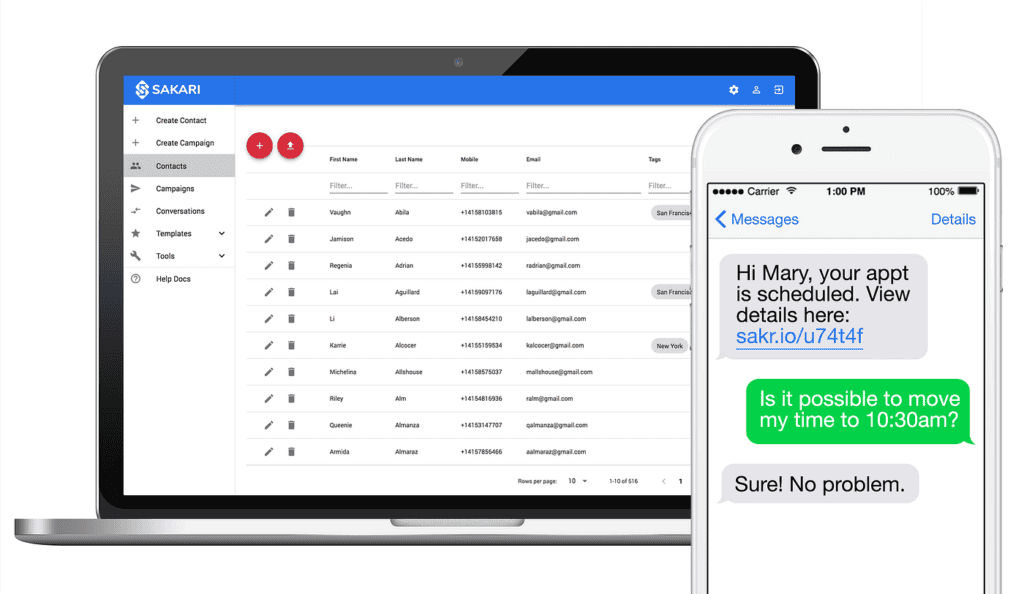
Sakari is a HubSpot-integrated SMS platform with genuine international reach, supporting 200+ countries. It’s the most common pick when the user base extends beyond North America and a US-only tool won’t work.
Key features
- Multi-country messaging with local number options in 200+ regions
- Native HubSpot workflow integration and A/B testing with AI-generated variants
- GDPR compliance features for EU markets
- Landline texting support
- Credit-based pricing with rollover
Pricing
Starts at $25 per month for approximately 823 message segments. Additional segments at $0.0304 each. See Sakari’s pricing page for current details.
Rating
4.6 out of 5 on G2. Reviewers frequently mention the workflow integration and international support.
Who it’s best for
Companies with customers or leads outside North America. Global sales teams running outbound across multiple regions. Teams that need GDPR-compliant opt-in handling out of the box. Marketing teams A/B testing message variants at scale.
Who it’s NOT for
Domestic-only US teams, who will pay for global capabilities they won’t use and can get simpler pricing elsewhere. Teams with very low message volume where the credit system creates more accounting overhead than value.
5. Textline: Best for customer support two-way conversations
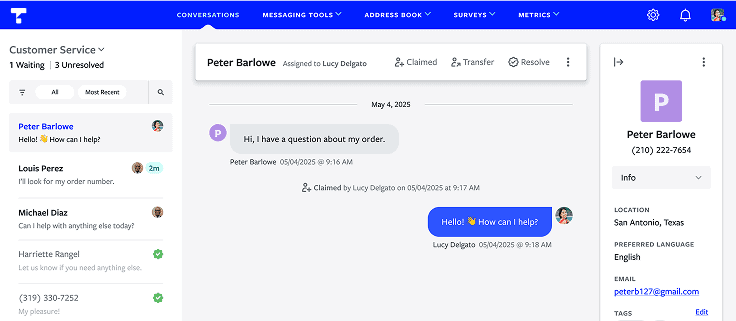
Textline is purpose-built for business texting with a support-first design. Its strongest feature is the shared inbox for two-way customer conversations, with HIPAA support for healthcare and financial teams.
Key features
- Universal inbox for SMS, WebChat, and social messages
- HubSpot integration for bi-directional contact sync
- HIPAA compliance for healthcare teams
- Automations, surveys, and team routing
- Group messaging and announcements
Pricing
Standard plan starts at $59.97 per month. See Textline’s pricing for current plans.
Rating
4.7 out of 5 on Trustpilot. Customer reviews frequently praise the shared inbox experience and support responsiveness.
Who it’s best for
Customer support and service teams where two-way conversation quality matters more than outbound campaign volume. Healthcare teams needing HIPAA compliance. Operations teams coordinating with customers over text.
Who it’s NOT for
Marketing teams running large-scale promotional campaigns where per-message pricing eats the budget. Teams that don’t need a shared inbox, since the inbox is the product and paying for it when you won’t use it is wasted spend.

Turn HubSpot Into A Real-Time SMS Engine with Message IQ
 Two-Way Conversations
 Shared Team Inbox
 Automation Triggers
 Advanced Reporting
 Compliance Tools
- 98% SMS read within 3 min
- 78% Buy from first responder
- 21× More likely to qualify

*MessageIQ is an Integrate IQ product built natively for HubSpot by the same team.
6. TextUs: Best for sales teams with compliance-heavy outreach
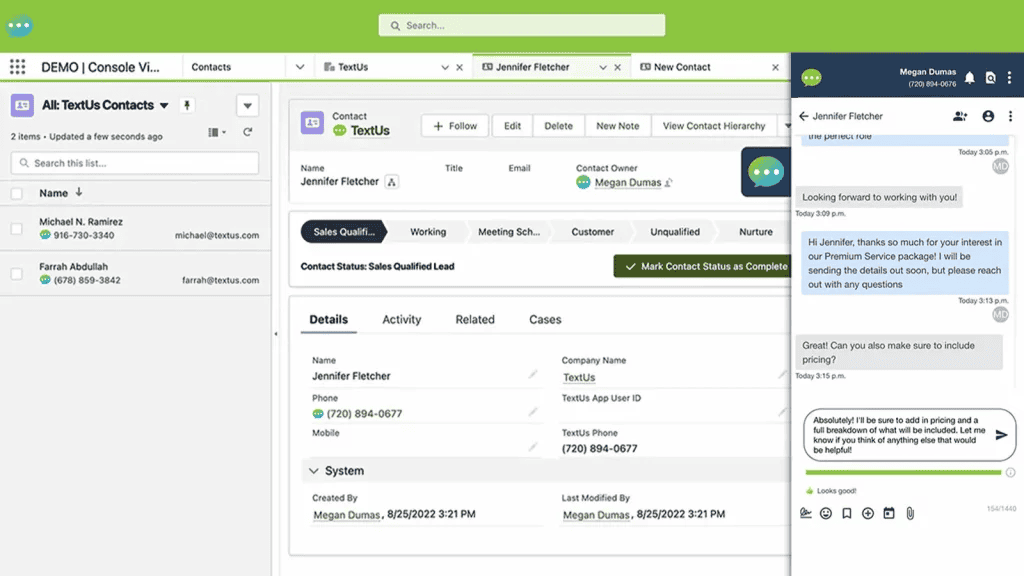
TextUs is designed for sales teams running high-volume texting with compliance guardrails built in. It lives inside HubSpot rather than outside it, with workflow triggers on form submissions, lifecycle changes, and deal updates.
Key features
- Native HubSpot integration with conversations accessible from contact records
- Workflow-triggered SMS and MMS on form submissions and deal updates
- Real-time event-based messaging
- Compliance features for regulated outbound
- Two-way conversation flow beyond one-way blast
Pricing
Custom pricing. See TextUs’s pricing page or contact their sales team.
Rating
4.4 out of 5 on G2. Reviewers emphasize HubSpot workflow integration and sales use cases.
Who it’s best for
Sales organizations with compliance-heavy outbound (staffing, recruiting, insurance, financial services). Mid-market to enterprise teams where custom pricing makes sense. Teams that want tight HubSpot lifecycle integration for sales-stage-triggered messaging.
Who it’s NOT for
Small teams on tight budgets, since custom pricing typically lands above the $29 to $60 range of simpler tools. Marketing-first teams whose primary need is promotional campaigns rather than sales follow-up.
7. EZ Texting: Best for plug-and-play bulk campaigns

EZ Texting is a straightforward SMS marketing platform with native HubSpot integration. It’s designed to be operational quickly, with template libraries, AI-assisted message writing, and a clear onboarding flow for teams new to SMS.
Key features
- Native HubSpot workflow integration
- AI Compose and AI Reply for message drafting
- Shared team inbox
- Customizable templates and keyword opt-ins
- Stock-photo MMS support
Pricing
Launch plan starts at $25 per month (up to 400 contacts). Boost plan at $75 per month (500 to 2,000 contacts). See EZ Texting’s pricing for current tiers.
Rating
4.4 out of 5 on GetApp. A common pick for retail and SMB marketing teams running promotional campaigns.
Who it’s best for
Small and mid-sized marketing teams running promotional campaigns, coupon drops, and event reminders. Teams without technical resources that want SMS live within a few days of signup. Businesses already using HubSpot for basic email who want SMS as a natural extension.
Who it’s NOT for
Teams needing two-way support conversations as the primary use case. EZ Texting’s automations and campaigns are the strength, not conversation management. Teams with very small contact lists where the Launch plan’s 400-contact cap is too generous for what they actually pay.
8. SimpleTexting: Best for team texting with broad integrations
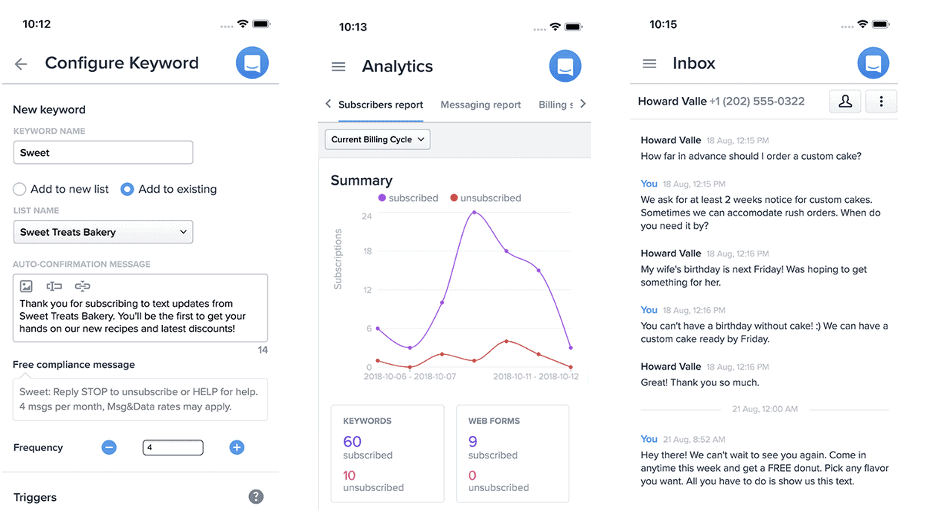
SimpleTexting is a long-established SMS platform with HubSpot integration via Zapier and a broader ecosystem of connectors. It’s positioned for teams that want SMS alongside many other tools in the stack.
Key features
- HubSpot integration through Zapier or native connectors
- Unlimited keywords and self-service billing on every plan
- Rollover credits
- Three user seats included per plan
- Contests, polls, and survey tools
Pricing
Starts at $39 per month. See SimpleTexting’s pricing for current plans.
Rating
4.6 out of 5 on G2. A mature product with a broad feature set.
Who it’s best for
Teams that use multiple marketing tools and want SMS integrated across several of them, not just HubSpot. Marketing teams running contests, polls, or survey campaigns. Teams that need three user seats without per-seat upcharges.
Who it’s NOT for
HubSpot-first teams that want a deep native integration. SimpleTexting’s HubSpot connection runs via Zapier or add-ons, not as a first-class HubSpot Marketplace app. Teams that specifically need SMS as a native HubSpot workflow action.
9. Twilio: Best for developer teams building custom integrations

Twilio is the SMS API that powers a significant chunk of the industry. It’s not a plug-and-play HubSpot app. It’s infrastructure you build on. HubSpot itself uses Twilio as the backend for its native Marketing SMS add-on.
Key features
- Programmable Messaging API covering SMS, MMS, WhatsApp, RCS, and voice
- Global coverage in 180+ countries with carrier compliance managed per region
- Extensive SDKs and documentation for custom integrations
- Flexible per-message pricing
- Enterprise-grade infrastructure and uptime
Pricing
Pay-as-you-go from $0.008 per SMS (US), plus phone number fees and carrier surcharges. See Twilio’s pricing for current rates.
Rating
4.3 out of 5 on G2. Reviews emphasize flexibility and developer experience, with pricing as the most common critique at scale.
Who it’s best for
Engineering teams with developer resources who need SMS flows that off-the-shelf tools can’t support. Enterprises with custom compliance or routing requirements. Product teams building SMS into their own application, not just into a HubSpot workflow.
Who it’s NOT for
Marketing or sales teams without engineering support, who will spend more on developer time than they’d ever pay for a native HubSpot app. Small teams where the operational overhead of maintaining a Twilio integration outweighs the flexibility benefit.
How to choose the right SMS tool for HubSpot
The fastest way to narrow the field is to match your situation to 2 or 3 tools, then run short trials. Here’s a decision framework based on the use-case wins above.
| If your situation is… | …shortlist these tools |
|---|---|
| HubSpot-first, want SMS inside workflows with zero middleware | MessageIQ, Salesmsg, Heymarket |
| High-volume outbound sales team with compliance requirements | Salesmsg, TextUs, Heymarket |
| Sending internationally (200+ countries) | Sakari, Twilio |
| Need HIPAA or SOC2 for healthcare, legal, or regulated industries | Heymarket, Textline |
| Tight budget, simple bulk sends, no complex automation | EZ Texting, SimpleTexting |
| Enterprise with developer resources, need custom flows | Twilio, TextUs |
| Two-way customer support, shared inbox is the core need | Textline, Heymarket |
Beyond this matching, run each shortlisted tool against the evaluation criteria from earlier. Depth of HubSpot integration tends to be the criterion that separates the final pick, because every other feature is downstream of whether the tool lives inside HubSpot or outside it.
Setup considerations most teams miss
Before committing to any tool, there are realities the vendor pages don’t always lead with. These are the gotchas that show up in week two of implementation.
HubSpot plan-tier gating
HubSpot Workflows, where SMS automation actually lives, require Marketing Hub Professional, Sales Hub Professional, or Operations Hub Professional minimum. Starter plans can send one-to-one SMS through most native tools but can’t run triggered workflows. See HubSpot’s SMS setup documentation for specifics.
A2P 10DLC registration timelines
Application-to-person messaging on US carriers requires 10DLC brand and campaign registration. HubSpot’s own documentation lists a 6 to 8 business day waiting period for long code numbers and 8 to 12 weeks for short code numbers. Don’t plan a campaign launch for next Tuesday if you’re not yet registered.
Geographic coverage
Most HubSpot-native SMS tools (MessageIQ, Salesmsg, EZ Texting, Textline) are US and Canada only. If your audience extends internationally, Sakari and Twilio are the realistic options. Heymarket supports some international but primarily through specific partner agreements.
Carrier trust score
Deliverability on long code numbers depends on a carrier-assigned trust score, which factors in your brand registration, campaign use case, and traffic patterns. A low trust score throttles your throughput regardless of which software you chose. Tools with direct carrier relationships tend to navigate this better than pure software platforms, because they can escalate when a carrier flags legitimate traffic.
Compliance features vary significantly
Automatic STOP keyword handling, opt-out properties written back to HubSpot, and 10DLC registration assistance are not universal. Check each tool’s specific compliance handling, not just its marketing page. For a deeper primer on the legal side, see our guide to TCPA and CAN-SPAM compliance.
Frequently asked questions
What’s the difference between HubSpot’s native SMS and a third-party SMS tool?
HubSpot’s native Marketing SMS is a paid add-on available only on Marketing Hub Professional or Enterprise plans, and it runs on Twilio under the hood. Third-party SMS tools like those listed above typically offer deeper two-way conversation handling, more flexible automation, and better pricing at volume. Many teams use a third-party native HubSpot app even when they already have the HubSpot Marketing SMS add-on.
How much does SMS marketing for HubSpot typically cost?
Entry tiers for native HubSpot SMS apps range from $25 to $60 per month for small volumes. Credit-based tools scale by message count, so actual costs depend on volume. Per-message APIs like Twilio start at $0.008 per SMS but add phone number and carrier fees. Always calculate total monthly cost at your projected volume, not just the advertised starting price.
Which SMS tool has the deepest HubSpot integration?
MessageIQ positions itself as having the deepest HubSpot integration in the Marketplace, with SMS as a native workflow action, auto-created Active Lists and custom properties on install, and conversations logged automatically to the contact record. Salesmsg and Heymarket also offer strong native integrations and have longer track records with more reviews. See MessageIQ’s HubSpot integration details for specifics.
Do I need a HubSpot subscription to use these tools?
Yes for the native integrations. You’ll need at least HubSpot Starter for contact-level texting and Marketing Hub Professional (or Sales/Operations Hub Professional) for workflow-based automation. Some tools operate independently of HubSpot and connect through Zapier or middleware, but the HubSpot-native depth the reader is typically looking for requires a qualifying HubSpot plan.
What compliance features should I look for?
Automatic STOP keyword handling, a synced opt-out property on the HubSpot contact record, A2P 10DLC registration support, and documented TCPA-compliant opt-in flows. For regulated industries, look for SOC2 Type II and HIPAA certifications specifically (Heymarket, Textline, and some others offer these). If a tool doesn’t clearly document compliance handling, treat that as a red flag.
Can I send SMS internationally from HubSpot?
Depends on the tool. Sakari covers 200+ countries with local number options. Twilio supports global messaging as infrastructure. Most other HubSpot-native SMS apps are US and Canada only. If your contact list includes international numbers, filter your shortlist early.
Get 300+ SMS Templates
Enter your details to download the PDF instantly.
Download Started!
Your 300+ SMS Templates PDF is downloading now. If it didn’t start, click here.
Where to go from here
The best SMS marketing software for HubSpot isn’t a single answer. It’s the tool that matches your specific use case, plan tier, compliance requirements, and team size. The nine tools above cover the realistic shortlist for HubSpot-first teams, each winning its category honestly. If deep HubSpot integration is the category that matters most to you, MessageIQ is built for that exact fit: SMS as a native workflow action, two-way conversations logged to the contact record, and carrier relationships for deliverability, starting at $29 per month with a 30-day money-back guarantee in the US and Canada. You can see how the HubSpot integration works or walk through sending your first SMS from HubSpot if you want to see the workflow before making a shortlist call.